Configure Sensors for the robot#
LiDAR Configuration Parameters#
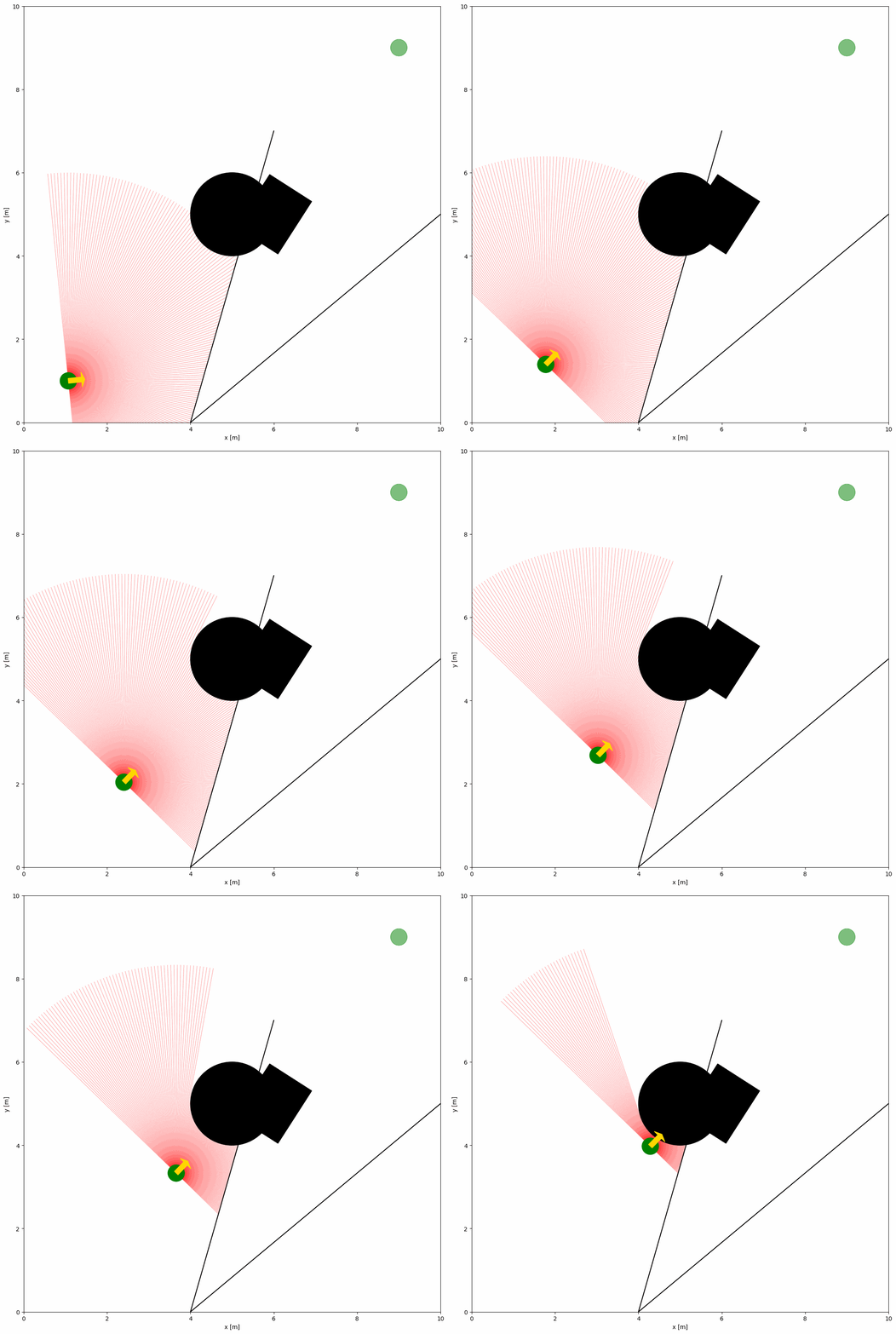
The YAML configuration file and Python Script below shows an example of a robot with a 2D LiDAR sensor:
import irsim

env = irsim.make()

for i in range(1000):

    env.step()
    env.render(0.05)

    if env.done():
        break

env.end()
YAML file (same name as the python script):
world:
  height: 10
  width: 10

robot:
  - kinematics: {name: 'diff'}  # omni, diff, acker
    shape: {name: 'circle', radius: 0.2}  # radius
    goal: [9, 9, 0]

    sensors:
      - name: 'lidar2d'
        range_min: 0
        range_max: 5
        angle_range: 3.14
        number: 200
        noise: False
        alpha: 0.3

obstacle:
  - shape: {name: 'circle', radius: 1.0}  # radius
    state: [5, 5, 0]

  - shape: {name: 'rectangle', length: 1.5, width: 1.2}  # length, width
    state: [6, 5, 1]

  - shape: {name: 'linestring', vertices: [[10, 5], [4, 0], [6, 7]]}  # vertices
    state: [0, 0, 0]
Tip
Update order
The environment updates sensors after all objects have moved in a step. This avoids temporal skew in readings. If you control objects manually, either pass sensor_step=True to ObjectBase.step(...) or call obj.sensor_step() after updating object states.
Important Parameters Explained
To configure the 2D LiDAR sensor, the sensor name of lidar2d should be defined in the sensors section of the robot. Key parameters of the LiDAR sensor are explained below:
range_min: The minimum range of the laser beam.
range_max: The maximum range of the laser beam.
angle_range: The angle range of the laser beam.
number: The number of beams.
alpha: The transparency of the laser beam.
A full list of parameters can be found in the YAML Configuration.
Advanced Lidar Configuration with noise
To add noise to the LiDAR sensor, you can set the noise parameter to True.
import irsim

env = irsim.make()

for i in range(1000):

    env.step()
    env.render(0.05)

    if env.done():
        break

env.end()
world:
  height: 10
  width: 10

robot:
  - kinematics: {name: 'diff'}  # omni, diff, acker
    shape: {name: 'circle', radius: 0.2}  # radius
    goal: [9, 9, 0]

    sensors:
      - name: 'lidar2d'
        range_min: 0
        range_max: 5
        angle_range: 3.14 #  4.7123
        number: 200
        noise: True
        std: 0.1
        angle_std: 0.2
        offset: [0, 0, 0]
        alpha: 0.3

obstacle:
  - shape: {name: 'circle', radius: 1.0}  # radius
    state: [5, 5, 0]

  - shape: {name: 'rectangle', length: 1.5, width: 1.2}  # length, width
    state: [6, 5, 1]

  - shape: {name: 'linestring', vertices: [[10, 5], [4, 0], [6, 7]]}  # vertices
    state: [0, 0, 0]
Gaussian noise is added to the LiDAR sensor with the std and angle_std parameters. The std parameter is the standard deviation of the range noise, and the angle_std parameter is the standard deviation of the angle noise.
FOV Configuration Parameters
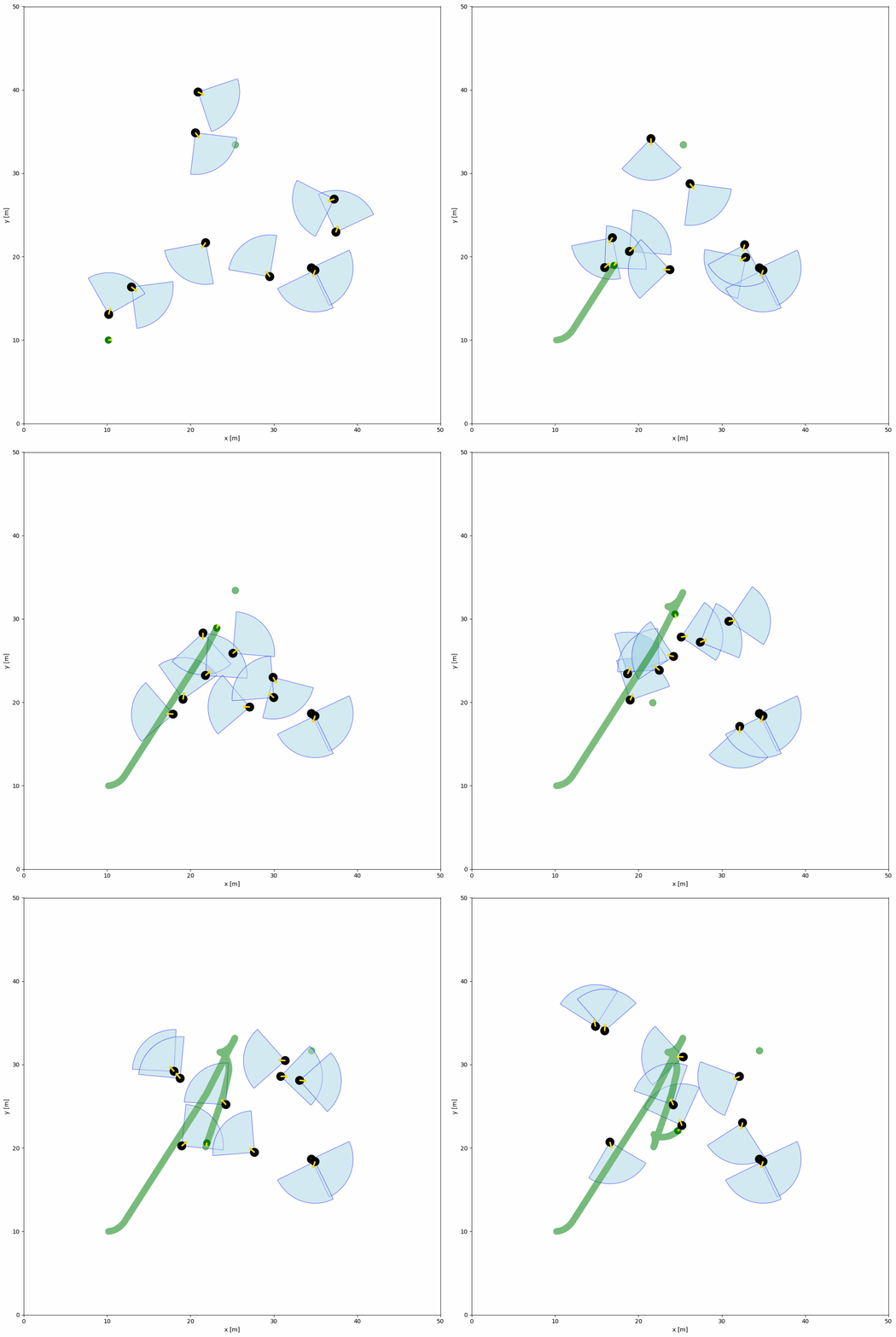
The YAML configuration file and Python Script below shows an example of objects within the field of view (FOV). The FOV is defined by the fov (float) and fov_radius (float) parameters in the object configuration. Each object has a FOV that can detect the robot within the FOV by the function fov_detect_object().
import irsim

env = irsim.make()

for i in range(200):

    env.step()

    for obs in env.obstacle_list:
        if obs.fov_detect_object(env.robot):
            print(f'The robot is in the FOV of the {obs.name}. The parameters of this obstacle are: state [x, y, theta]: {obs.state.flatten()}, velocity [linear, angular]: {obs.velocity.flatten()}, fov in radian: {obs.fov}.')

    env.render(figure_kwargs={'dpi': 100})

env.end()
world:
  height: 50
  width: 50
  step_time: 0.1
  sample_time: 0.1
  offset: [0, 0]
  collision_mode: 'stop'
  control_mode: 'auto'

robot:
  - kinematics: {name: 'diff'}  # omni, diff, acker
    shape: {name: 'circle', radius: 0.4}
    state: [10, 10, 0, 0]
    goal: [45, 45, 0]
    goal_threshold: 0.4
    vel_max: [3, 1]
    vel_min: [-3, -1]
    behavior: {name: 'dash', wander: True, range_low: [15, 15, -3.14], range_high: [35, 35, 3.14]}
    plot:
        show_goal: True
        show_trajectory: True

obstacle:
  - number: 10
    distribution: {name: 'random', range_low: [10, 10, -3.14], range_high: [40, 40, 3.14]}
    kinematics: {name: 'diff'}
    behavior: {name: 'rvo', vxmax: 1.5, vymax: 1.5, acce: 1.0, factor: 2.0, mode: 'vo', wander: True, range_low: [15, 15, -3.14], range_high: [35, 35, 3.14], target_roles: 'all'}
    vel_max: [3, 3.14]
    vel_min: [-3, -3.14]
    shape:
      - {name: 'circle', radius: 0.5}  # radius
    fov: 1.57
    fov_radius: 5.0
    plot:
      show_fov: True
      show_arrow: True
      arrow_length: 0.8