Configure grid map environment#
The grid map is a 2D occupancy grid used for collision detection and path planning. You configure it via the obstacle_map key in the world section of the YAML file. The grid is built by a map generator; built-in generators are image (from a PNG file) and perlin (procedural noise). You can also add custom generators (see Adding a new map generator).
Overview#
obstacle_mapaccepts:null, a generator spec dict (recommended), a string path (shorthand for image), or an ndarray (programmatic use only).Generator spec is a dict with
nameidentifying the generator and generator-specific parameters. Grid size and semantics depend on the generator.mdownsample(world section): downsampling factor applied to the generated grid to reduce resolution and computation.
Quick example#
import irsim

env = irsim.make()

for i in range(1000):
    env.step()
    env.render(0.05)
    if env.done():
        break
env.end()
world:
  height: 50
  width: 50
  obstacle_map: 'cave.png'   # shorthand for image generator
  mdownsample: 2

robot:
  - kinematics: {name: 'acker'}
    shape: {name: 'rectangle', length: 4.6, width: 1.6, wheelbase: 3}
    state: [5, 5, 0, 0]
    goal: [40, 40, 0]
    vel_max: [4, 1]
    plot:
      show_trail: true
      show_trajectory: true
    sensors:
      - name: 'lidar2d'
        range_min: 0
        range_max: 20
        angle_range: 3.14
        number: 100
        alpha: 0.4

obstacle:
  - number: 10
    distribution: {name: 'manual'}
    shape:
      - {name: 'polygon', random_shape: true, center_range: [5, 10, 40, 30], avg_radius_range: [0.5, 2]}
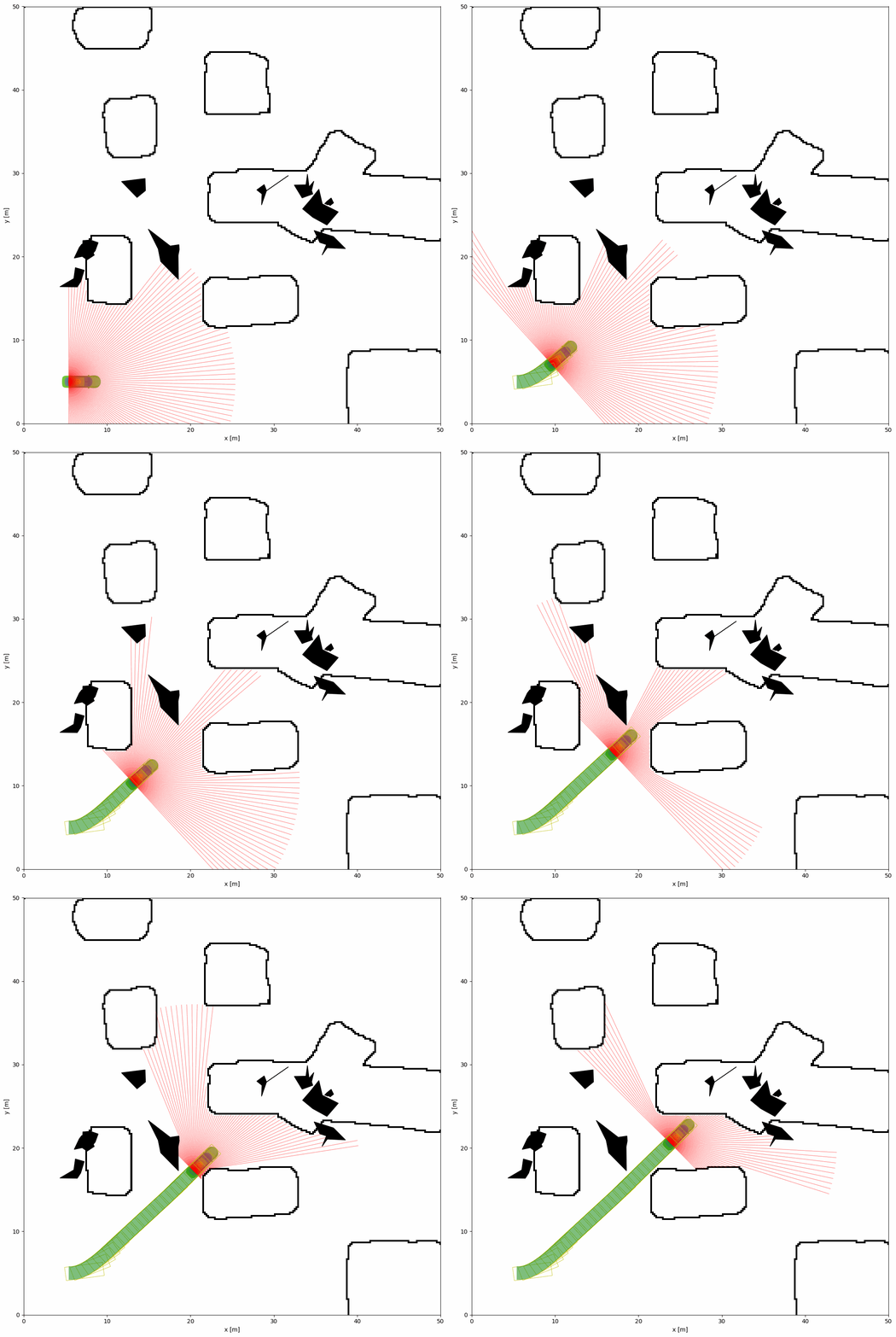
Obstacle map types#
Canonical form: generator spec dict
Use a dict with name and parameters. Two built-in generators:
name: image— load grid from an image file. Onlypathis required. Grid size comes from the image dimensions.name: perlin— procedural Perlin noise grid. Requiresresolution(meters per cell); grid size = worldwidth/height÷resolution.
Other accepted values
String (e.g.
'cave.png'): treated as{ name: image, path: 'cave.png' }(backward compatible).null: no obstacle map (empty free space).ndarray: programmatic use only (e.g. when constructing the world in Python). Float array 0–100; cells above 50 are obstacles. Not available from YAML.
Built-in generators#
Image generator (name: image)#
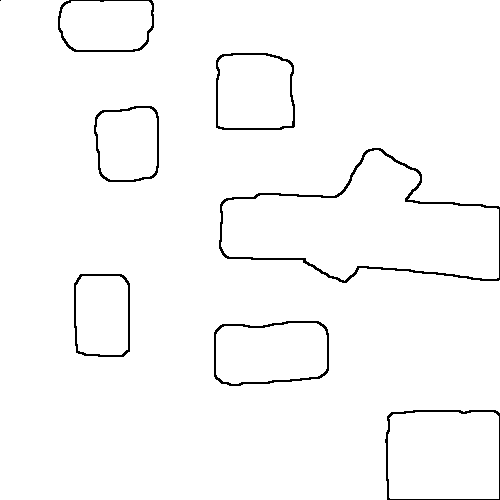
Loads an image file (e.g. PNG) and converts it to a 0–100 occupancy grid. Black pixels become obstacles (high value), white pixels free space (low value). Grid size is the image size in pixels.
YAML (explicit):
world:
  width: 50
  height: 50
  obstacle_map:
    name: image
    path: 'cave.png'
  mdownsample: 2
YAML (shorthand): obstacle_map: 'cave.png' is equivalent to the above.
Image location: The path is resolved relative to the script directory or the package world/map search path. You can use absolute or relative paths. Place cave.png in the same directory as your script, or set the path accordingly.
Tip
Use custom PNG images for different environments. Values are interpreted as: darker → obstacle, lighter → free. Absolute or relative paths are supported.
Perlin generator (name: perlin)#
Procedural grid from Perlin noise. Grid size is determined by world size and resolution: e.g. world 20 m × 20 m with resolution: 0.1 gives 200×200 cells.
YAML:
world:
  height: 20
  width: 20
  mdownsample: 1
  obstacle_map:
    name: perlin
    resolution: 0.1    # meters per cell → 200×200 grid
    complexity: 0.12
    fill: 0.32
    fractal: 1
    attenuation: 0.5
    seed: 48          # optional; omit for random map each run
Parameters (see irsim.world.map.PerlinGridGenerator): complexity, fill, fractal, attenuation, seed (optional). resolution is required; width and height (in cells) are computed from world size and must not be set in YAML.
Full example: usage/10grid_map/grid_map_perlin.yaml and grid_map_perlin.py.
Downsampling (mdownsample)#
mdownsample is an integer (default 1) applied to the generated grid: the grid is subsampled by this factor (e.g. 2 → every 2×2 block becomes one cell). Use it to reduce resolution and speed up collision checks. Only applies when an obstacle map is present.
Adding a new map generator#
To add a custom generator (e.g. maze, other procedural maps), implement a class under irsim/world/map/ and register it by importing in irsim/world/map/__init__.py.
1. Implement the generator
Subclass
GridMapGenerator(fromirsim.world.map.grid_map_generator_base).Implement
_build_grid(self) -> np.ndarray: return an occupancy grid of shape(width, height), values 0–100 (values > 50 are obstacles). The framework passeswidthandheightto your__init__(derived from world size andresolution).Set class attributes:
name(str): YAML key, e.g.name = "maze".yaml_param_names(tuple): parameter names from YAML passed to__init__(e.g.("seed", "density")). Do not include"name","resolution","width", or"height"—resolutionis required in the spec;widthandheightare injected by the framework.
2. Register
Import the new class in irsim/world/map/__init__.py. Registration is automatic: subclasses of GridMapGenerator with a non-empty name are added to GridMapGenerator.registry when the class is defined. Optionally add the class to __all__.
3. Use in YAML
Your generator (like perlin) goes through build_grid_from_generator: the spec must include name and resolution. Grid size is (world width / resolution, world height / resolution). Example:
world:
  width: 20
  height: 20
  obstacle_map:
    name: maze
    resolution: 0.1
    seed: 42
    density: 0.3
Skeleton example:
# irsim/world/map/my_maze_generator.py
from .grid_map_generator_base import GridMapGenerator
import numpy as np

class MazeGridGenerator(GridMapGenerator):
    name = "maze"
    yaml_param_names = ("seed", "density")

    def __init__(self, width: int, height: int, seed: int = 0, density: float = 0.3, **kwargs):
        super().__init__(**kwargs)
        self.width = width
        self.height = height
        self.seed = seed
        self.density = density

    def _build_grid(self) -> np.ndarray:
        # Build (self.width, self.height) grid, values 0–100
        ...
        return grid.astype(np.float64)
Note: The image generator is special: it does not use resolution or world size (grid comes from the image) and is handled in resolve_obstacle_map. All other generators use build_grid_from_generator and require resolution; width and height are computed and passed by the framework.