Configure behavior for objects#
Each object in the simulation can be assigned a behavior independently to simulate different scenarios. The behavior of the object can be configured by specifying the behavior parameters in the YAML configuration file.
IR-SIM supports two types of behavior configuration:
behavior: Controls individual object movement (e.g.,dash,rvo,sfm)group_behavior: Coordinates behavior for all objects in a group (e.g.,orca)
Behavior Configuration Parameters#
Built-in individual behaviors are dash (move directly to the goal), rvo (reciprocal velocity obstacles for multi-agent collision avoidance), and sfm (Social Force Model — reactive pedestrian-style avoidance). By default, moving objects have no behavior and remain static unless an external command is supplied.
Behaviors are registered per kinematics, so not every (kinematics, behavior) pair exists:
Kinematics |
Available behaviors |
|---|---|
|
|
|
|
|
|
|
|
If you assign a behavior that is not registered for the kinematics (for example rvo on acker), object construction will fail. Use a custom behavior to fill the gaps.
The example of RVO behavior is shown below:
import irsim

env = irsim.make()

for i in range(1000):

    env.step()
    env.render(0.05)

    if env.done():
        break

env.end()
world:
  height: 10  # the height of the world
  width: 10   # the width of the world

robot:
  - number: 10
    distribution: {name: 'circle', radius: 4.0, center: [5, 5]}
    kinematics: {name: 'diff'}
    shape:
      - {name: 'circle', radius: 0.2}
    behavior: {name: 'rvo', vxmax: 1.5, vymax: 1.5, acce: 1.0, factor: 1.0}
    vel_min: [-3, -3.0]
    vel_max: [3, 3.0]
    color: ['royalblue', 'red', 'green', 'orange', 'purple', 'yellow', 'cyan', 'magenta', 'lime', 'pink', 'brown']
    arrive_mode: position
    goal_threshold: 0.15
    plot:
      show_trail: true
      show_goal: true
      trail_fill: true
      trail_alpha: 0.2
      show_trajectory: false
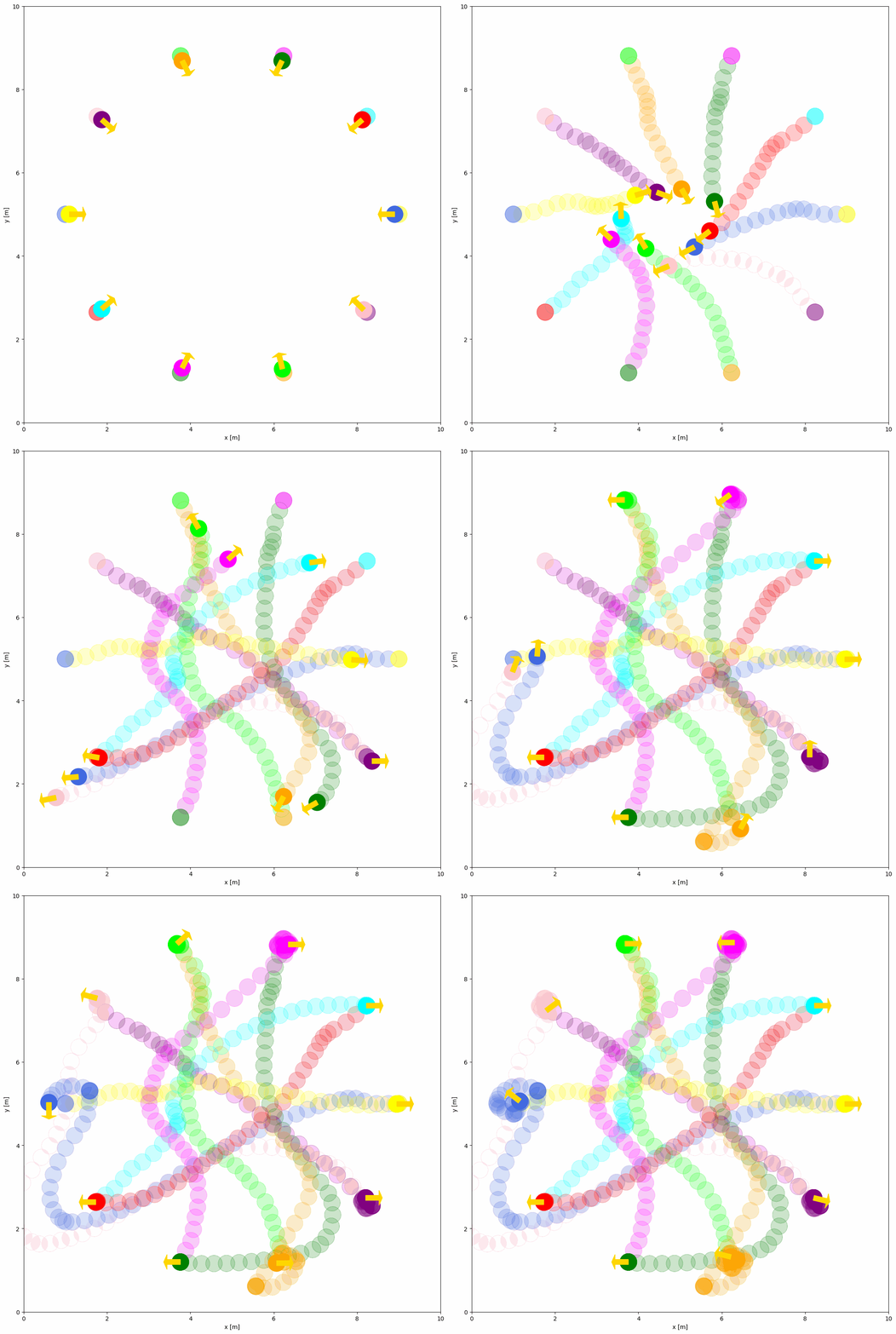
Important Behavior Parameters Explained#
Common Parameters:
name: Behavior type ('dash','rvo','sfm', or custom name)wander: Random goal generation after reaching current goal (default:False)loop: Loop through waypoints continuously when reaching the last goal (default:False)target_roles: Filter objects for behavior ('all','robot','obstacle')
RVO-specific Parameters:
vxmax/vymax: Maximum velocities in x/y directions (default:1.5)acce: Maximum acceleration (default:1.0)factor: Collision penalty weight (default:1.0, higher = more conservative)mode: Algorithm variant -'rvo'(default),'hrvo', or'vo'neighbor_threshold: Detection range for nearby objects (default:3.0meters)
SFM-specific Parameters (anisotropic Moussaid-Helbing 2009 variant):
vmax: Speed cap applied after force integration (default:1.5)neighbor_threshold: Social-interaction cutoff distance (default:10.0)relaxation_time: Goal-pull time constanttau(default:0.5)force_factor_desired: Weight on the goal-seeking force (default:1.0)force_factor_social: Weight on inter-agent repulsion (default:2.1)force_factor_obstacle: Weight on obstacle repulsion (default:10.0)sigma_obstacle: Exponential decay length of obstacle force (default:0.8)lambda_importance: Relative weight of velocity vs. position in the interaction direction (default:2.0)gamma: Sets the interaction rangeB = gamma * ||t||(default:0.35)n_angular/n_velocity: Angular sharpness exponents for the sideways and slowdown components (defaults:2.0,3.0)
Dash-specific Parameters:
angle_tolerance: Orientation alignment tolerance fordiff/acker(default:0.1radians)
Full list of behavior parameters can be found in the YAML Configuration.
SFM (Social Force Model)#
sfm is a reactive avoidance behavior that treats each agent as a Newtonian particle under three forces — a goal-pull, an anisotropic neighbor repulsion (people on the agent’s motion path push back more than people behind), and an exponential obstacle repulsion. The implementation uses the anisotropic variant from Moussaid, Helbing et al. (2009).
sfm complements rvo/orca: RVO and ORCA are geometric and provably collision-free under their assumptions, while SFM is behavioral and produces more human-looking trajectories — including occasional brush-bys, hesitations, and the asymmetric reaction to neighbors ahead vs. behind. Use SFM when crowd realism matters; use RVO/ORCA when collision-freeness is the priority.
The example below is usage/23sfm_world/sfm_world.yaml: twenty-four pedestrians crossing a +-shaped intersection of two 6.6 m corridors. Each lane carries a head-on pair (W↔E in blue/red, S↔N in green/orange), and the L-shaped wall corners enter SFM as line obstacles so agents bend around them instead of cutting the corner.
Note
Place the YAML file in the same directory as the main Python script.
import irsim

env = irsim.make()

while not env.done():
    env.step()
    env.render(0.01)

env.end()
world:
  height: 20
  width: 20
  step_time: 0.1
  offset: [-10, -10]
  collision_mode: 'unobstructed'   # SFM is reactive; allow brief overlap
  control_mode: 'auto'

robot:
  - number: 24
    distribution: {name: 'manual'}
    kinematics: {name: 'diff'}
    shape: [{name: 'circle', radius: 0.25}]
    # 12 horizontal head-on pairs + 12 vertical head-on pairs, interleaved
    # so adjacent indices share a lane (ir-sim steps objects sequentially,
    # so the pair coupling depends on adjacency in env.objects).
    state:
      - [-9, -2.6, 0]
      - [ 9, -2.601, 3.14]
      - [-9, -1.6, 0]
      - [ 9, -1.601, 3.14]
      # ... (six horizontal lanes + six vertical lanes, see usage file)
    goal:
      - [ 9, -2.6, 0]
      - [-9, -2.601, 3.14]
      - [ 9, -1.6, 0]
      - [-9, -1.601, 3.14]
      # ...
    color:
      - 'royalblue'   # W->E
      - 'red'         # E->W
      # ... (alternating blue/red horizontally, green/orange vertically)
    behavior:
      name: 'sfm'
      loop: true
      vmax: 0.7
      neighbor_threshold: 5.0
      force_factor_social: 6.0
      force_factor_obstacle: 8.0       # walls must hold during loop-reset
      lambda_importance: 1.0           # cleaner repulsion along line of centres
      gamma: 0.5
      sigma_obstacle: 0.6              # wall felt across most of the 6.6 m corridor
      n_angular: 1.5                   # agents commit to a side earlier
      n_velocity: 2.5
      safety_radius: 0.12              # 0.24 m personal bubble
    vel_min: [-1.5, -3.0]
    vel_max: [ 1.5,  3.0]
    arrive_mode: position
    goal_threshold: 1.0                # loop-reset fires before the wall stalls the goal approach
    plot: {show_trail: true, show_goal: true, trail_fill: true, trail_alpha: 0.2, keep_trail_length: 25}

obstacle:
  - number: 4
    distribution: {name: 'manual'}
    state: [0, 0, 0]
    unobstructed: true
    shape:
      - {name: 'linestring', vertices: [[-10,  3.3], [-3.3,  3.3], [-3.3,  10]]}
      - {name: 'linestring', vertices: [[ 10,  3.3], [ 3.3,  3.3], [ 3.3,  10]]}
      - {name: 'linestring', vertices: [[-10, -3.3], [-3.3, -3.3], [-3.3, -10]]}
      - {name: 'linestring', vertices: [[ 10, -3.3], [ 3.3, -3.3], [ 3.3, -10]]}
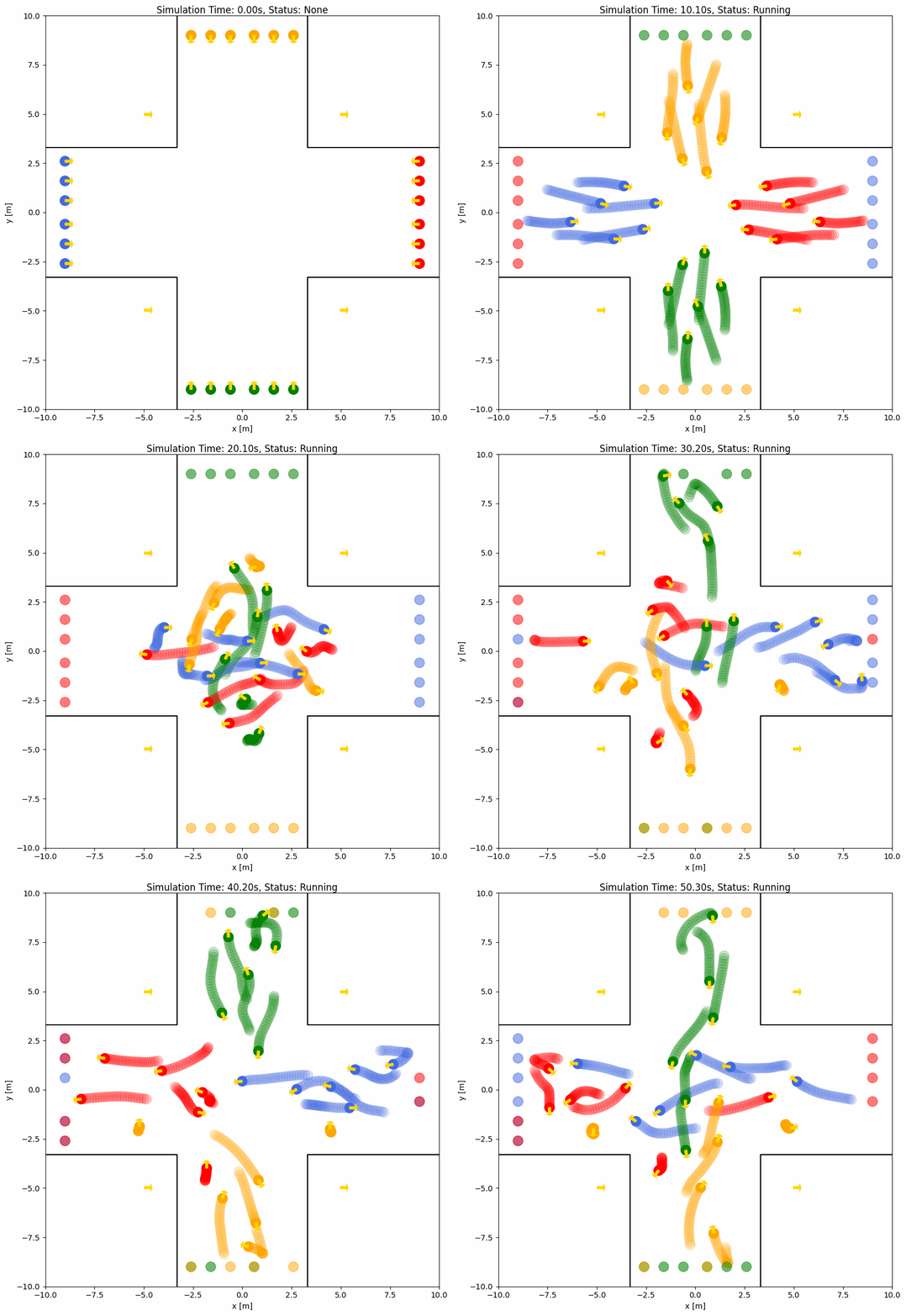
See usage/23sfm_world/ for the full runnable file (24-agent cross corridor plus a separate two-robot head-on pass).
RVO with Line Obstacles#
rvo automatically avoids linestring-shaped obstacles in addition to circular agents. Each line segment between consecutive vertices of a linestring object is treated as a static velocity obstacle, so RVO agents can navigate around walls or polylines without extra configuration:
robot:
  - number: 6
    kinematics: {name: 'diff'}
    shape: {name: 'circle', radius: 0.2}
    distribution: {name: 'circle', radius: 4.0, center: [5, 5]}
    behavior: {name: 'rvo'}

obstacle:
  - shape: {name: 'linestring', vertices: [[2, 2], [2, 8], [8, 8]]}
This works for both omni and diff kinematics; non-linestring obstacles continue to participate as agent neighbors.
Group Behavior#
While behavior controls individual object movement, group_behavior enables coordinated behavior for all objects within the same group. Group behavior computes actions for all members in a single step, making it more efficient than individual behaviors for coordinated scenarios.
Behavior vs Group Behavior#
Feature |
|
|
|---|---|---|
Scope |
Individual object |
All objects in a group |
Computation |
Per-object each step |
All members at once |
Use case |
Simple navigation |
Coordinated multi-agent |
Available |
|
|
ORCA (Optimal Reciprocal Collision Avoidance)#
ORCA is a classical built-in group-level collision avoidance algorithm that computes optimal velocities for multiple agents simultaneously. It ensures smooth, collision-free navigation even with hundreds of agents.
Note
ORCA requires the pyrvo library, which is a python binding for the ORCA C++ algorithm. Install it using:
pip install pyrvo
Basic ORCA Configuration#
import irsim

env = irsim.make()

while True:
    env.step()
    env.render()

    if env.done():
        break

env.end()
world:
  height: 290
  width: 290
  step_time: 0.1
  sample_time: 0.7
  offset: [-140, -140]

robot:
  - number: 200
    kinematics: {name: 'omni'}
    shape: {name: 'circle', radius: 1.0}
    distribution: {name: 'circle', radius: 140}
    color: 'g'
    goal_threshold: 0.1
    vel_max: [3, 3]
    vel_min: [-3, -3]
    plot:
      show_trajectory: True
      show_goal: True
      keep_traj_length: 50
    group_behavior:
      name: 'orca'
      neighborDist: 15.0
      maxNeighbors: 10
      timeHorizon: 20.0
      timeHorizonObst: 10.0
      safe_radius: 0.5
      maxSpeed: 2.0
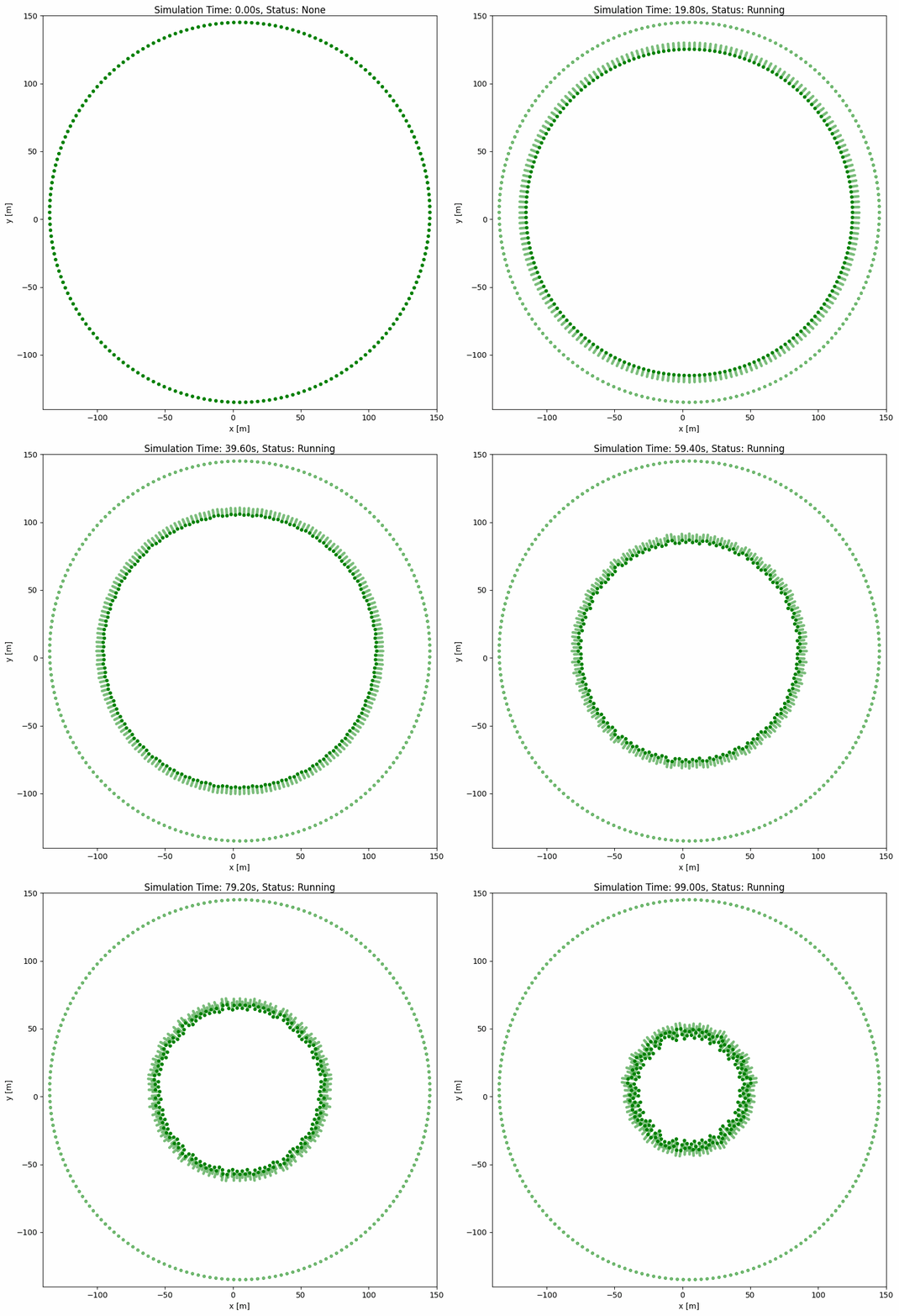
ORCA Parameters Explained#
Parameter |
Type |
Default |
Description |
|---|---|---|---|
|
|
- |
Must be |
|
|
|
Maximum distance to consider other agents as neighbors |
|
|
|
Maximum number of neighbors to consider for collision avoidance |
|
|
|
Time horizon for agent-agent collision avoidance (seconds) |
|
|
|
Time horizon for agent-obstacle collision avoidance (seconds) |
|
|
|
Additional safety margin added to agent radius |
|
|
|
Maximum speed override (uses robot’s |
|
|
|
Generate random goals when current goal is reached |
|
|
|
Loop through waypoints continuously when reaching the last goal |
|
|
- |
Lower bounds for random goal generation |
|
|
- |
Upper bounds for random goal generation |
ORCA with Random Wandering#
For continuous simulation where agents keep moving after reaching their goals:
import irsim

env = irsim.make()

for i in range(1000):
    env.step()
    env.render()

    if env.done():
        break

env.end()
world:
  height: 290
  width: 290
  step_time: 0.1
  sample_time: 0.7
  offset: [-140, -140]

robot:
  - number: 100
    kinematics: {name: 'omni'}
    shape: {name: 'circle', radius: 1.0}
    distribution: {name: 'random', range_low: [-100, -100, -3.14], range_high: [100, 100, 3.14]}
    color: 'g'
    goal_threshold: 0.1
    vel_max: [3, 3]
    vel_min: [-3, -3]
    plot:
      show_trajectory: True
      show_goal: True
      keep_traj_length: 50
    group_behavior:
      name: 'orca'
      neighborDist: 15.0
      maxNeighbors: 10
      timeHorizon: 20.0
      timeHorizonObst: 10.0
      safe_radius: 0.5
      maxSpeed: 2.0
      wander: True
      range_low: [-100, -100, -3.14]
      range_high: [100, 100, 3.14]
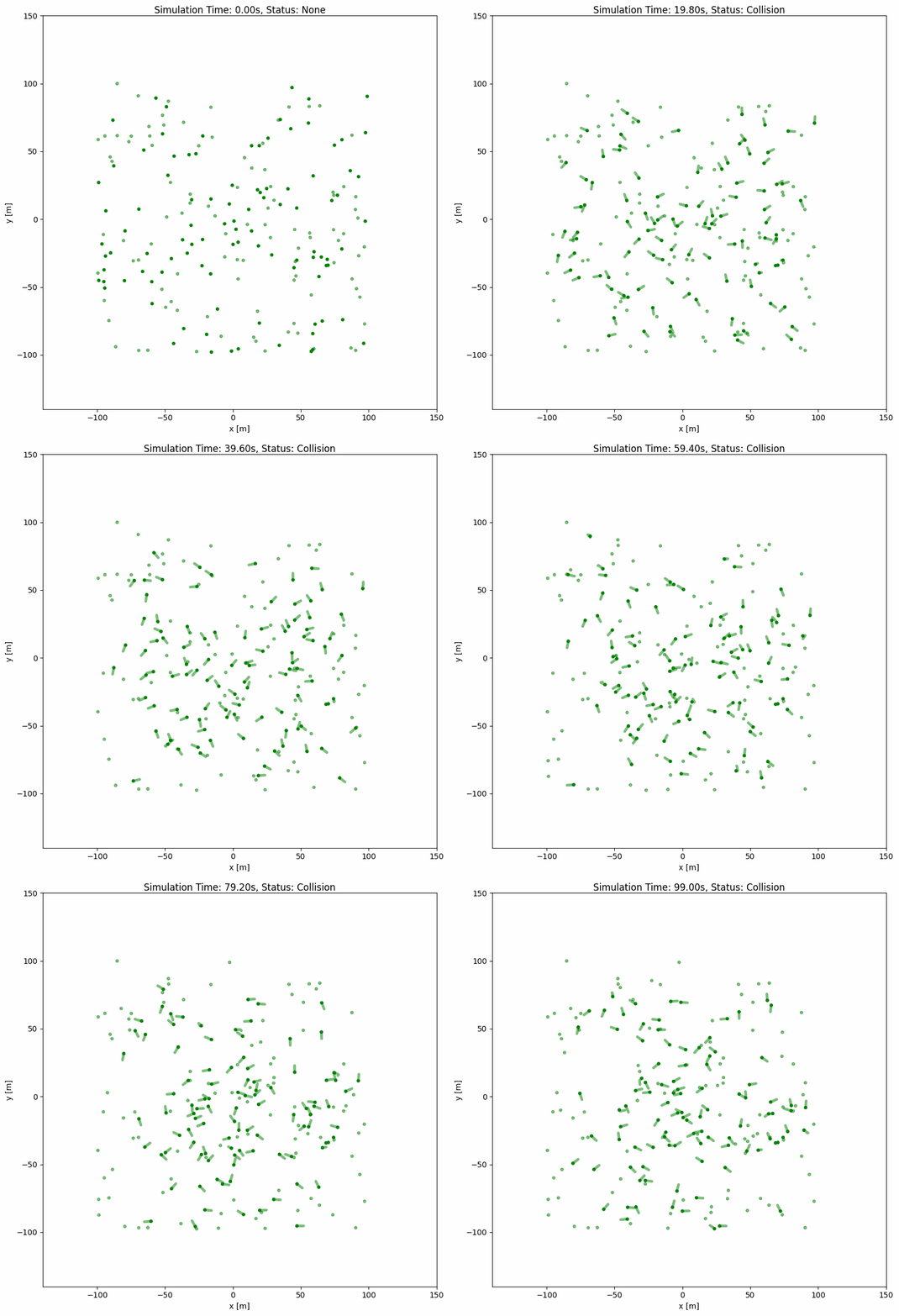
Custom Group Behavior#
You can create custom group behaviors for coordinated multi-agent control. IR-SIM provides two registration patterns:
@register_group_behavior: Function-based (called every step)@register_group_behavior_class: Class-based (initialized once, then called every step)
Function-based vs Class-based Behaviors#
Aspect |
Function-based |
Class-based |
|---|---|---|
Decorator |
|
|
Initialization |
None (stateless) |
Once at start |
State |
No persistent state |
Can maintain state between steps |
Use case |
Simple calculations |
Complex algorithms with initialization |
Example |
Simple formation control |
ORCA (requires simulator setup) |
Custom Group Behavior Example (Class-based)#
Here’s an example of a custom group behavior that implements simple formation control:
# custom_group_methods.py
from typing import Any
import numpy as np
from irsim.lib.behavior.behavior_registry import register_group_behavior_class
from irsim.world.object_base import ObjectBase


@register_group_behavior_class("omni", "formation")
def init_formation_behavior(members: list[ObjectBase], **kwargs: Any):
    """Registered initializer returning a class-based handler."""
    return FormationGroupBehavior(members, **kwargs)


class FormationGroupBehavior:
    """
    Class-based formation group behavior.
    Maintains formation shape while moving toward goals.
    """

    def __init__(
        self,
        members: list[ObjectBase],
        formation_gain: float = 1.0,
        goal_gain: float = 0.5,
        **kwargs: Any,
    ) -> None:
        """
        Initialize formation behavior.

        Args:
            members: List of group members
            formation_gain: Weight for formation keeping
            goal_gain: Weight for goal reaching
        """
        self._formation_gain = formation_gain
        self._goal_gain = goal_gain

        # Calculate initial formation offsets (relative positions)
        if members:
            centroid = np.mean([m.state[:2, 0] for m in members], axis=0)
            self._offsets = [m.state[:2, 0] - centroid for m in members]
        else:
            self._offsets = []

    def __call__(
        self, members: list[ObjectBase], **kwargs: Any
    ) -> list[np.ndarray]:
        """
        Generate velocities for all members to maintain formation.

        Args:
            members: Current group members
            **kwargs: Additional parameters

        Returns:
            List of velocity arrays for each member
        """
        if not members:
            return []

        velocities = []

        # Calculate current centroid
        centroid = np.mean([m.state[:2, 0] for m in members], axis=0)

        # Calculate target centroid (average of all goals)
        goals = [m.goal[:2, 0] for m in members if m.goal is not None]
        if goals:
            target_centroid = np.mean(goals, axis=0)
        else:
            target_centroid = centroid

        for i, member in enumerate(members):
            # Desired position in formation
            desired_pos = centroid + self._offsets[i] if i < len(self._offsets) else member.state[:2, 0]

            # Formation keeping velocity
            formation_vel = self._formation_gain * (desired_pos - member.state[:2, 0])

            # Goal reaching velocity
            goal_vel = self._goal_gain * (target_centroid - centroid)

            # Combined velocity
            vel = formation_vel + goal_vel

            # Clip to max speed
            speed = np.linalg.norm(vel)
            if speed > member.max_speed:
                vel = vel / speed * member.max_speed

            velocities.append(np.c_[vel])

        return velocities
Using Custom Group Behavior#
import irsim

env = irsim.make()
env.load_behavior("custom_group_methods")

for i in range(500):
    env.step()
    env.render()

    if env.done():
        break

env.end()
world:
  height: 20
  width: 20

robot:
  - number: 5
    kinematics: {name: 'omni'}
    shape: {name: 'circle', radius: 0.3}
    distribution: {name: 'circle', radius: 3, center: [10, 10]}
    color: 'blue'
    goal: [15, 15]
    vel_max: [2, 2]
    vel_min: [-2, -2]
    group_behavior:
      name: 'formation'
      formation_gain: 1.0
      goal_gain: 0.5
Function-based Group Behavior Example#
For simpler behaviors without initialization requirements:
# custom_group_methods.py
from typing import Any
import numpy as np
from irsim.lib.behavior.behavior_registry import register_group_behavior
from irsim.world.object_base import ObjectBase


@register_group_behavior("omni", "swarm")
def beh_omni_swarm(
    members: list[ObjectBase], **kwargs: Any
) -> list[np.ndarray]:
    """
    Simple swarm behavior - all members move toward group centroid.

    Args:
        members: List of group members
        **kwargs: Additional parameters (cohesion_gain, goal_gain)

    Returns:
        List of velocity arrays for each member
    """
    if not members:
        return []

    cohesion_gain = kwargs.get("cohesion_gain", 0.5)
    goal_gain = kwargs.get("goal_gain", 1.0)

    # Calculate centroid
    centroid = np.mean([m.state[:2, 0] for m in members], axis=0)

    velocities = []
    for member in members:
        # Cohesion: move toward centroid
        cohesion_vel = cohesion_gain * (centroid - member.state[:2, 0])

        # Goal: move toward individual goal
        if member.goal is not None:
            goal_vel = goal_gain * (member.goal[:2, 0] - member.state[:2, 0])
        else:
            goal_vel = np.zeros(2)

        vel = cohesion_vel + goal_vel

        # Clip to max speed
        speed = np.linalg.norm(vel)
        if speed > member.max_speed:
            vel = vel / speed * member.max_speed

        velocities.append(np.c_[vel])

    return velocities
Important
Use
@register_group_behavior_classwhen your behavior needs initialization (e.g., setting up external libraries, computing initial states)Use
@register_group_behaviorfor simple stateless behaviorsThe first argument is the kinematics type (
'omni','omni_angular','diff','acker')The second argument is the behavior name used in YAML
group_behavior: {name: 'your_name'}
Advanced Configuration for Custom Behavior#
Custom Behavior Function#
If you want to create a custom behavior for the object, you should first define your own behavior in a custom python script (e.g. custom_behavior_methods.py) as shown below:
from irsim.lib import register_behavior
from irsim.util.util import relative_position, WrapToPi
import numpy as np

@register_behavior("diff", "dash_custom")
def beh_diff_dash(ego_object, objects, **kwargs):

    state = ego_object.state
    goal = ego_object.goal
    goal_threshold = ego_object.goal_threshold
    _, max_vel = ego_object.get_vel_range()
    angle_tolerance = kwargs.get("angle_tolerance", 0.1)

    behavior_vel = DiffDash2(state, goal, max_vel, goal_threshold, angle_tolerance)

    return behavior_vel


def DiffDash2(state, goal, max_vel, goal_threshold=0.1, angle_tolerance=0.2):

    distance, radian = relative_position(state, goal)

    if distance < goal_threshold:
        return np.zeros((2, 1))

    diff_radian = WrapToPi(radian - state[2, 0])
    linear = max_vel[0, 0] * np.cos(diff_radian)

    if abs(diff_radian) < angle_tolerance:
        angular = 0
    else:
        angular = max_vel[1, 0] * np.sign(diff_radian)

    return np.array([[linear], [angular]])
The ego_object is the object that you want to control, and the objects is the list of all objects in the simulation. The custom behavior function should return the velocity of the object. You can obtain the state, goal, and other properties from the objects. DiffDash2 is the custom behavior function that calculates the dash velocity of the object.
Important
You must use the @register_behavior decorator to register the custom behavior. The first argument of the decorator is the name of the kinematics (diff, acker, omni, omni_angular), and the second argument is the name of the behavior used in YAML file.
Register Behavior#
The python script and YAML to run the simulation with the custom behavior is shown below:
import irsim

env = irsim.make()
env.load_behavior("custom_behavior_methods")

for i in range(1000):

    env.step()
    env.render(0.01)

    if env.done():
        break

env.end(5)
load_behavior function loads the custom behavior methods from the python script. custom_behavior_methods is the name of the python script that contains the custom behavior function.
Note
Please place the script with the name custom_behavior_methods in the same directory as the main python script.
Now, you can use the custom behavior dash_custom in the YAML configuration file as shown below.
world:
  height: 10  # the height of the world
  width: 10   # the width of the world

robot:
  - number: 10
    distribution: {name: 'circle', radius: 4.0, center: [5, 5]}
    kinematics: {name: 'diff'}
    shape:
      - {name: 'circle', radius: 0.2}
    behavior: {name: 'dash_custom'}
    vel_min: [-3, -3.0]
    vel_max: [3, 3.0]
    color: ['royalblue', 'red', 'green', 'orange', 'purple', 'yellow', 'cyan', 'magenta', 'lime', 'pink', 'brown']
    arrive_mode: position
    goal_threshold: 0.15
    plot:
      show_trail: true
      show_goal: true
      trail_fill: true
      trail_alpha: 0.2
      show_trajectory: false
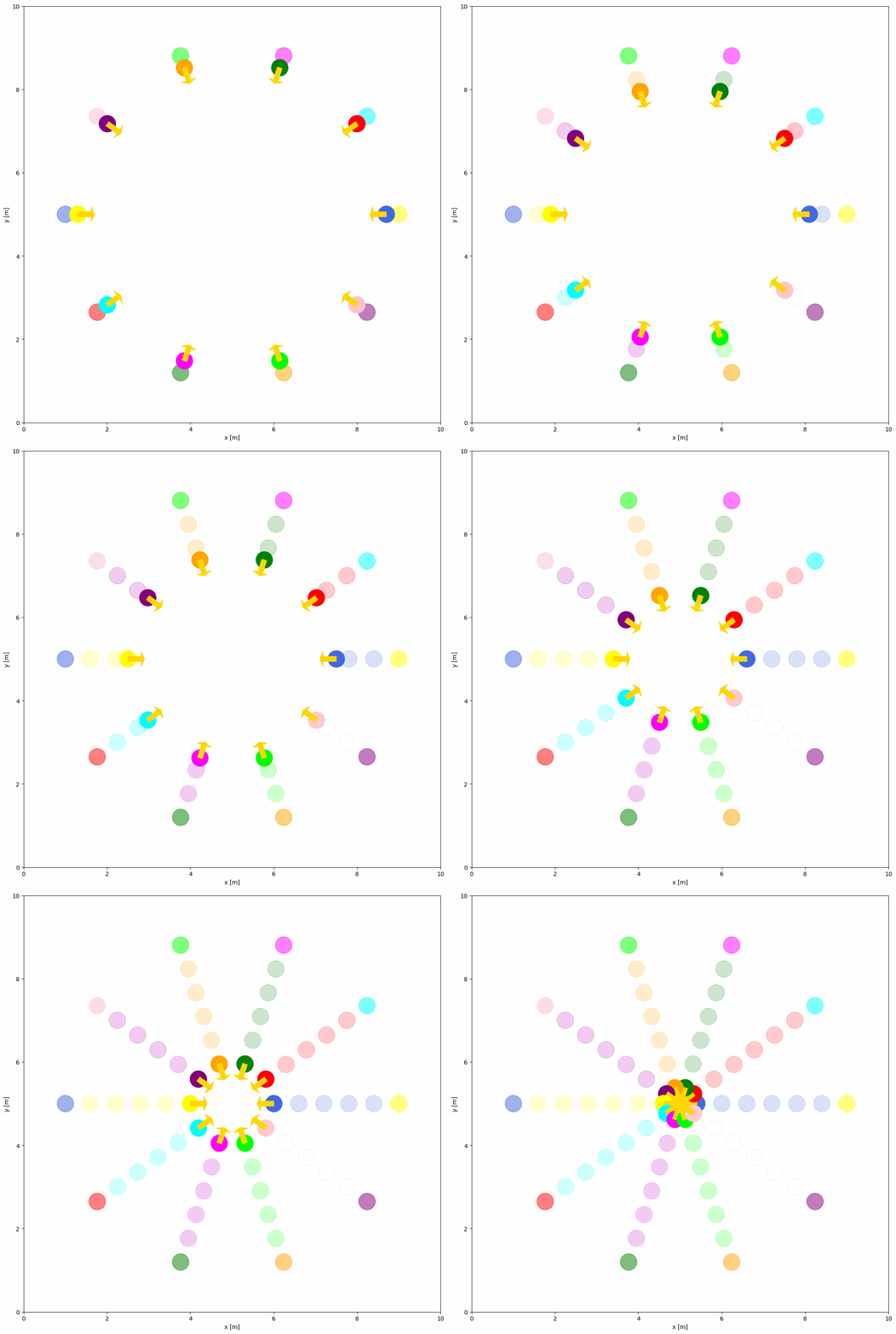
Custom Behavior Class (Stateful)#
For behaviors that require initialization or need to maintain state between steps, use the @register_behavior_class decorator. This is useful when:
Your behavior needs one-time setup (e.g., loading models, initializing planners)
You need to track history or state across simulation steps
You want to cache computations for efficiency
Function-based vs Class-based Individual Behaviors#
Aspect |
|
|
|---|---|---|
Execution |
Called every step |
|
State |
Stateless |
Can maintain internal state |
Setup |
None |
One-time initialization in |
Use case |
Simple reactive behaviors |
Complex planners, learning-based control |
Class-based Behavior Example#
# custom_behavior_methods.py
from typing import Any
import numpy as np
from irsim.lib.behavior.behavior_registry import register_behavior_class


@register_behavior_class("diff", "smooth_dash")
def init_smooth_dash(object_info, **kwargs):
    """Registered initializer returning a class-based handler."""
    return SmoothDashBehavior(object_info, **kwargs)


class SmoothDashBehavior:
    """
    Class-based smooth dash behavior with velocity smoothing.
    Maintains previous velocity for smooth acceleration.
    """

    def __init__(self, object_info, smoothing: float = 0.3, **kwargs):
        """
        Initialize smooth dash behavior.

        Args:
            object_info: Object information from ObjectBase
            smoothing: Smoothing factor (0-1), higher = smoother
        """
        self._smoothing = smoothing
        self._prev_vel = np.zeros((2, 1))
        self._object_info = object_info

    def __call__(
        self,
        ego_object,
        external_objects: list,
        **kwargs: Any,
    ) -> np.ndarray:
        """
        Generate smoothed velocity toward goal.

        Args:
            ego_object: The controlled object
            external_objects: Other objects in environment
            **kwargs: Additional parameters

        Returns:
            Smoothed velocity array (2x1)
        """
        if ego_object.goal is None:
            return np.zeros((2, 1))

        # Calculate desired velocity (simple dash)
        state = ego_object.state
        goal = ego_object.goal
        _, max_vel = ego_object.get_vel_range()

        diff = goal[:2, 0] - state[:2, 0]
        distance = np.linalg.norm(diff)

        if distance < ego_object.goal_threshold:
            target_vel = np.zeros((2, 1))
        else:
            # Convert to diff drive velocities
            angle_to_goal = np.arctan2(diff[1], diff[0])
            diff_angle = angle_to_goal - state[2, 0]
            diff_angle = np.arctan2(np.sin(diff_angle), np.cos(diff_angle))

            linear = max_vel[0, 0] * np.cos(diff_angle)
            angular = max_vel[1, 0] * np.sign(diff_angle) if abs(diff_angle) > 0.1 else 0

            target_vel = np.array([[linear], [angular]])

        # Apply smoothing (exponential moving average)
        smoothed_vel = (
            self._smoothing * self._prev_vel +
            (1 - self._smoothing) * target_vel
        )
        self._prev_vel = smoothed_vel

        return smoothed_vel
Using Class-based Behavior#
import irsim

env = irsim.make()
env.load_behavior("custom_behavior_methods")

for i in range(500):
    env.step()
    env.render(0.05)

    if env.done():
        break

env.end()
world:
  height: 10
  width: 10

robot:
  - kinematics: {name: 'diff'}
    shape: {name: 'circle', radius: 0.2}
    state: [2, 2, 0]
    goal: [8, 8]
    behavior:
      name: 'smooth_dash'
      smoothing: 0.5  # Custom smoothing parameter
    vel_max: [2, 2]
    vel_min: [-2, -2]
Behavior Registration Summary#
IR-SIM provides four behavior registration decorators:
Decorator |
Scope |
Type |
Use Case |
|---|---|---|---|
|
Individual |
Function |
Simple per-object behaviors |
|
Individual |
Class |
Stateful per-object behaviors |
|
Group |
Function |
Simple multi-agent coordination |
|
Group |
Class |
Complex multi-agent algorithms (e.g., ORCA) |
All decorators take two arguments:
Kinematics type:
'omni','omni_angular','diff', or'acker'Behavior name: The name used in YAML configuration
Tip
Choose the right decorator based on your needs:
Start with function-based (
@register_behavioror@register_group_behavior) for simple behaviorsUse class-based when you need initialization, state, or complex algorithms
Use group behaviors when actions depend on multiple agents together
External Controller Examples (CBF / C3BF)#
Not every controller needs to be wired through the behavior registry. The repository ships standalone safety-filter controllers under usage/21cbf_world/:
cbf_qp.py/cbf_world.py— distance-based Control Barrier Function safety filter solved as a QP. Wraps a nominal goal-seeking command and enforces collision avoidance against circular obstacles.c3bf_qp.py/c3bf_world.py— Collision-Cone CBF (C3BF) variant that also accounts for relative velocity, useful for dynamic obstacles.
Both examples support omni and diff kinematics, read the kinematics from YAML, and require the cvxpy solver (pip install cvxpy). See usage/21cbf_world/README.md for the full math, supported obstacle types, and known limitations.