Configure Sensors for the robot#
LiDAR Configuration Parameters#
The YAML configuration file and Python Script below shows an example of a robot with a 2D LiDAR sensor:
Python script:
import irsim

env = irsim.make()

for i in range(1000):

    env.step()
    env.render(0.05)

    if env.done():
        break

env.end()
YAML file (same name as the python script):
world:
  height: 10
  width: 10

robot:
  - kinematics: {name: 'diff'}  # omni, diff, acker
    shape: {name: 'circle', radius: 0.2}  # radius
    goal: [9, 9, 0]

    sensors:
      - name: 'lidar2d'
        range_min: 0
        range_max: 5
        angle_range: 3.14
        number: 200
        noise: False
        alpha: 0.3

obstacle:
  - shape: {name: 'circle', radius: 1.0}  # radius
    state: [5, 5, 0]

  - shape: {name: 'rectangle', length: 1.5, width: 1.2}  # length, width
    state: [6, 5, 1]

  - shape: {name: 'linestring', vertices: [[10, 5], [4, 0], [6, 7]]}  # vertices
    state: [0, 0, 0]
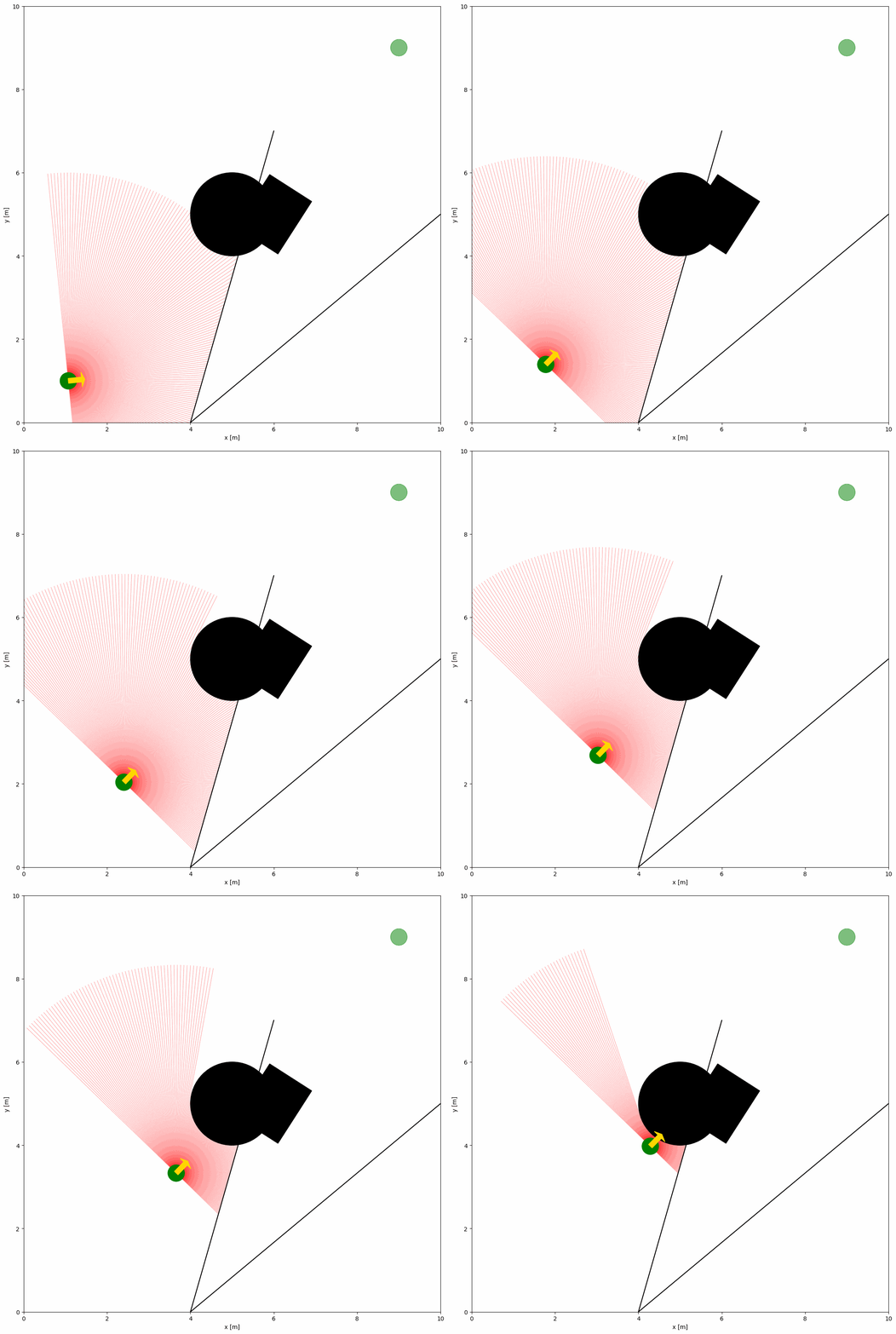
The demonstration shows below:
Important Parameters Explained#
To configure the 2D LiDAR sensor, the sensor name of lidar2d should be defined in the sensors section of the robot. Key parameters of the LiDAR sensor are explained below:
range_min: The minimum range of the laser beam.
range_max: The maximum range of the laser beam.
angle_range: The angle range of the laser beam.
number: The number of beams.
alpha: The transparency of the laser beam.
A full list of parameters can be found in the YAML Configuration.
Advanced Lidar Configuration with noise#
To add noise to the LiDAR sensor, you can set the noise parameter to True. The YAML configuration file:
world:
  height: 10
  width: 10

robot:
  - kinematics: {name: 'diff'}  # omni, diff, acker
    shape: {name: 'circle', radius: 0.2}  # radius
    goal: [9, 9, 0]

    sensors:
      - name: 'lidar2d'
        range_min: 0
        range_max: 5
        angle_range: 3.14 #  4.7123
        number: 200
        noise: True
        std: 0.1
        angle_std: 0.2
        offset: [0, 0, 0]
        alpha: 0.3

obstacle:
  - shape: {name: 'circle', radius: 1.0}  # radius
    state: [5, 5, 0]

  - shape: {name: 'rectangle', length: 1.5, width: 1.2}  # length, width
    state: [6, 5, 1]

  - shape: {name: 'linestring', vertices: [[10, 5], [4, 0], [6, 7]]}  # vertices
    state: [0, 0, 0]
Gaussian noise is added to the LiDAR sensor with the std and angle_std parameters. The std parameter is the standard deviation of the range noise, and the angle_std parameter is the standard deviation of the angle noise.
FOV Configuration Parameters#
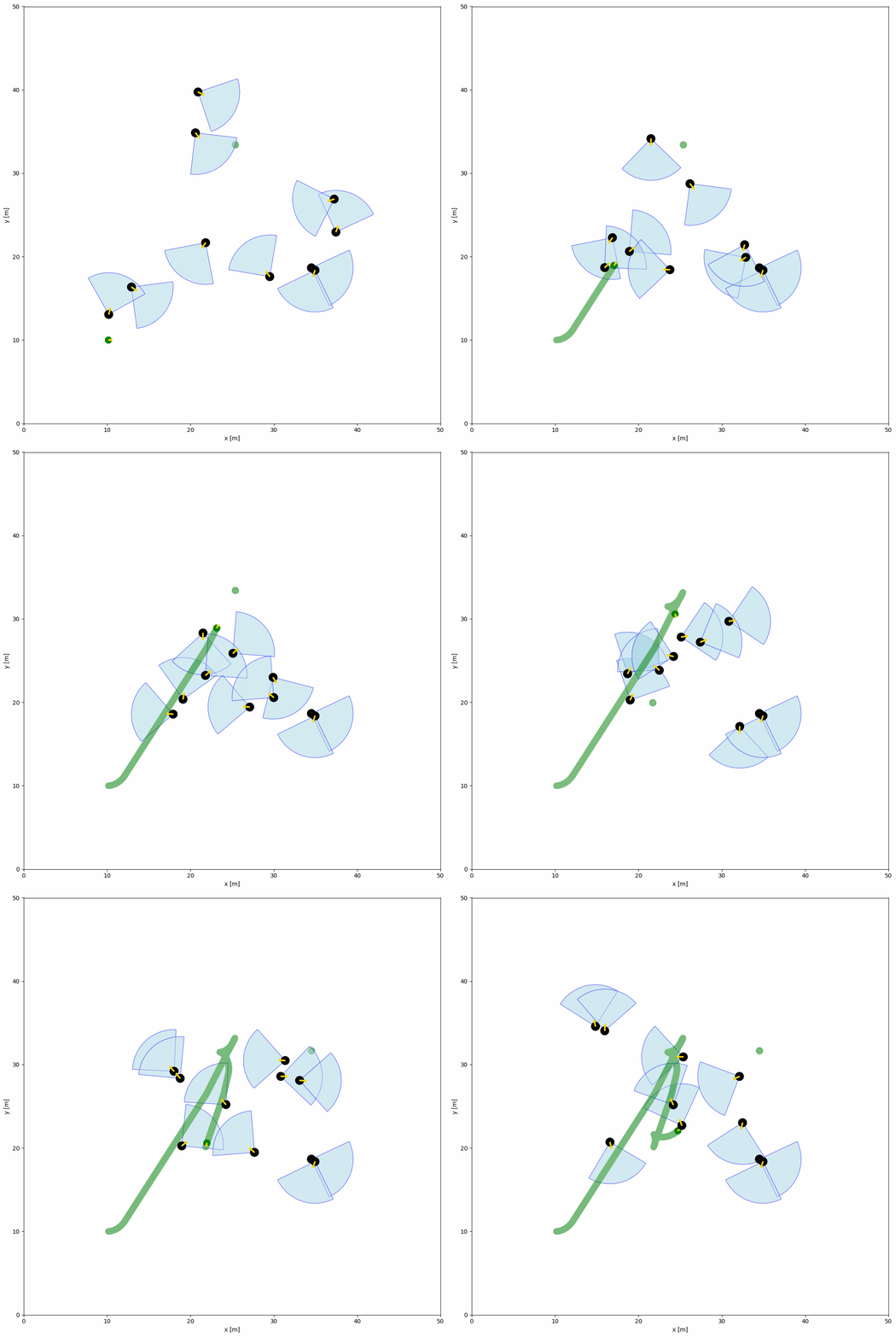
The YAML configuration file and Python Script below shows an example of objects within the field of view (FOV). The FOV is defined by the fov (float) and fov_radius (float) parameters in the object configuration. Each object has a FOV that can detect the robot within the FOV by the function fov_detect_object().
Python script:
import irsim

env = irsim.make()

for i in range(200):

    env.step()

    for obs in env.obstacle_list:
        if obs.fov_detect_object(env.robot):
            print(f'The robot is in the FOV of the {obs.name}. The parameters of this obstacle are: state [x, y, theta]: {obs.state.flatten()}, velocity [linear, angular]: {obs.velocity.flatten()}, fov in radian: {obs.fov}.')

    env.render(figure_kwargs={'dpi': 100})

env.end()
YAML file (same name as the python script):
world:
  height: 50
  width: 50
  step_time: 0.1
  sample_time: 0.1
  offset: [0, 0]
  collision_mode: 'stop'
  control_mode: 'auto'

robot:
  - kinematics: {name: 'diff'}  # omni, diff, acker
    shape: {name: 'circle', radius: 0.4}
    state: [10, 10, 0, 0]
    goal: [45, 45, 0]
    goal_threshold: 0.4
    vel_max: [3, 1]
    vel_min: [-3, -1]
    behavior: {name: 'dash', wander: True, range_low: [15, 15, -3.14], range_high: [35, 35, 3.14]}
    plot:
        show_goal: True
        show_trajectory: True

obstacle:
  - number: 10
    distribution: {name: 'random', range_low: [10, 10, -3.14], range_high: [40, 40, 3.14]}
    kinematics: {name: 'diff'}
    behavior: {name: 'rvo', vxmax: 1.5, vymax: 1.5, acce: 1.0, factor: 2.0, mode: 'vo', wander: True, range_low: [15, 15, -3.14], range_high: [35, 35, 3.14], target_roles: 'all'}
    vel_max: [3, 3.14]
    vel_min: [-3, -3.14]
    shape:
      - {name: 'circle', radius: 0.5}  # radius
    fov: 1.57
    fov_radius: 5.0
    plot:
      show_fov: True
      show_arrow: True
      arrow_length: 0.8
The demonstration shows below: