Configure Sensors for the robot#
Robots can carry sensors for environment perception. IR-SIM provides a 2D LiDAR (lidar2d) and a simplified 2D FMCW LiDAR (fmcw_lidar2d, with per-beam radial velocity), plus an optional field-of-view (FOV) region; all are attached per object in the YAML file. This page shows how to configure them and tune noise.
LiDAR Configuration Parameters#
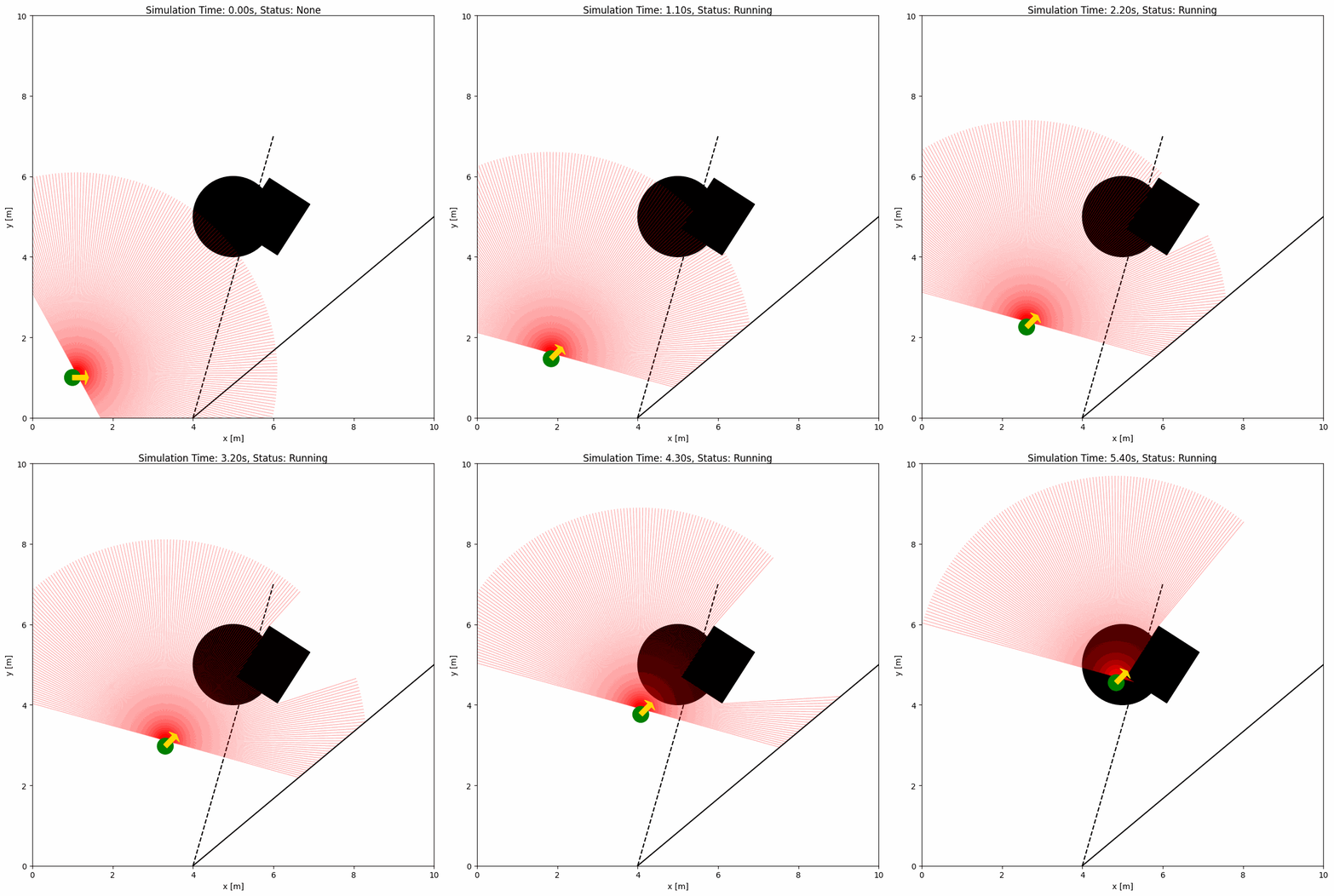
The YAML configuration file and Python Script below shows an example of a robot with a 2D LiDAR sensor:
import irsim

env = irsim.make()

for i in range(1000):

    env.step()
    env.render(0.05)

    if env.done():
        break

env.end()
YAML file (same name as the python script):
world:
  height: 10
  width: 10
  step_time: 0.1
  sample_time: 0.1
  offset: [0, 0]
  collision_mode: 'stop'
  control_mode: 'auto'

robot:
  - kinematics: {name: 'diff'}
    shape: {name: 'circle', radius: 0.2}
    state: [1, 1, 0]
    goal: [9, 9, 0]
    behavior: {name: 'dash'}

    sensors:
      - name: 'lidar2d'
        range_min: 0
        range_max: 5
        angle_range: 3.14
        number: 200
        noise: False
        std: 0.2
        angle_std: 0.2
        offset: [0.1, 0.1, 0.5]
        plot:
          alpha: 0.3

obstacle:
  - shape: {name: 'circle', radius: 1.0, center: [1, 1]}
    state: [5, 5, 0]
    unobstructed: True

  - shape: {name: 'rectangle', length: 1.5, width: 1.2}
    state: [6, 5, 1]

  - shape: {name: 'linestring', vertices: [[10, 5], [4, 0]]}
    state: [0, 0, 0]

  - shape: {name: 'linestring', vertices: [[4, 0], [6, 7]]}
    state: [0, 0, 0]
    unobstructed: True
    plot:
      obj_linestyle: '--'
Tip
Update order
The environment updates sensors after all objects have moved in a step. This avoids temporal skew in readings. If you control objects manually, either pass sensor_step=True to ObjectBase.step(...) or call obj.sensor_step() after updating object states.
Important Parameters Explained#
To configure the 2D LiDAR sensor, the sensor name of lidar2d should be defined in the sensors section of the robot. Key parameters of the LiDAR sensor are explained below:
range_min: The minimum range of the laser beam.
range_max: The maximum range of the laser beam.
angle_range: The angle range of the laser beam.
number: The number of beams.
alpha: The transparency of the laser beam.
A full list of parameters can be found in the YAML Configuration.
Advanced Lidar Configuration with noise#
To add noise to the LiDAR sensor, you can set the noise parameter to True.
import irsim

env = irsim.make()

for i in range(1000):

    env.step()
    env.render(0.05)

    if env.done():
        break

env.end()
world:
  height: 10
  width: 10
  step_time: 0.1
  sample_time: 0.1
  offset: [0, 0]
  collision_mode: 'stop'
  control_mode: 'auto'

robot:
  - kinematics: {name: 'diff', noise: True, alpha: [0.1, 0, 0, 0.3]}
    shape: {name: 'circle', radius: 0.2}
    state: [1, 1, 0]
    goal: [9, 9, 0]
    behavior: {name: 'dash', wander: True}

    plot:
      show_trajectory: True

    sensors:
      - type: 'lidar2d'
        range_min: 0
        range_max: 5
        angle_range: 3.14
        number: 200
        noise: True
        std: 0.1
        angle_std: 0.2
        offset: [0, 0, 0]
        alpha: 0.3

obstacle:
  - shape: {name: 'circle', radius: 1.0}
    state: [5, 5, 0]
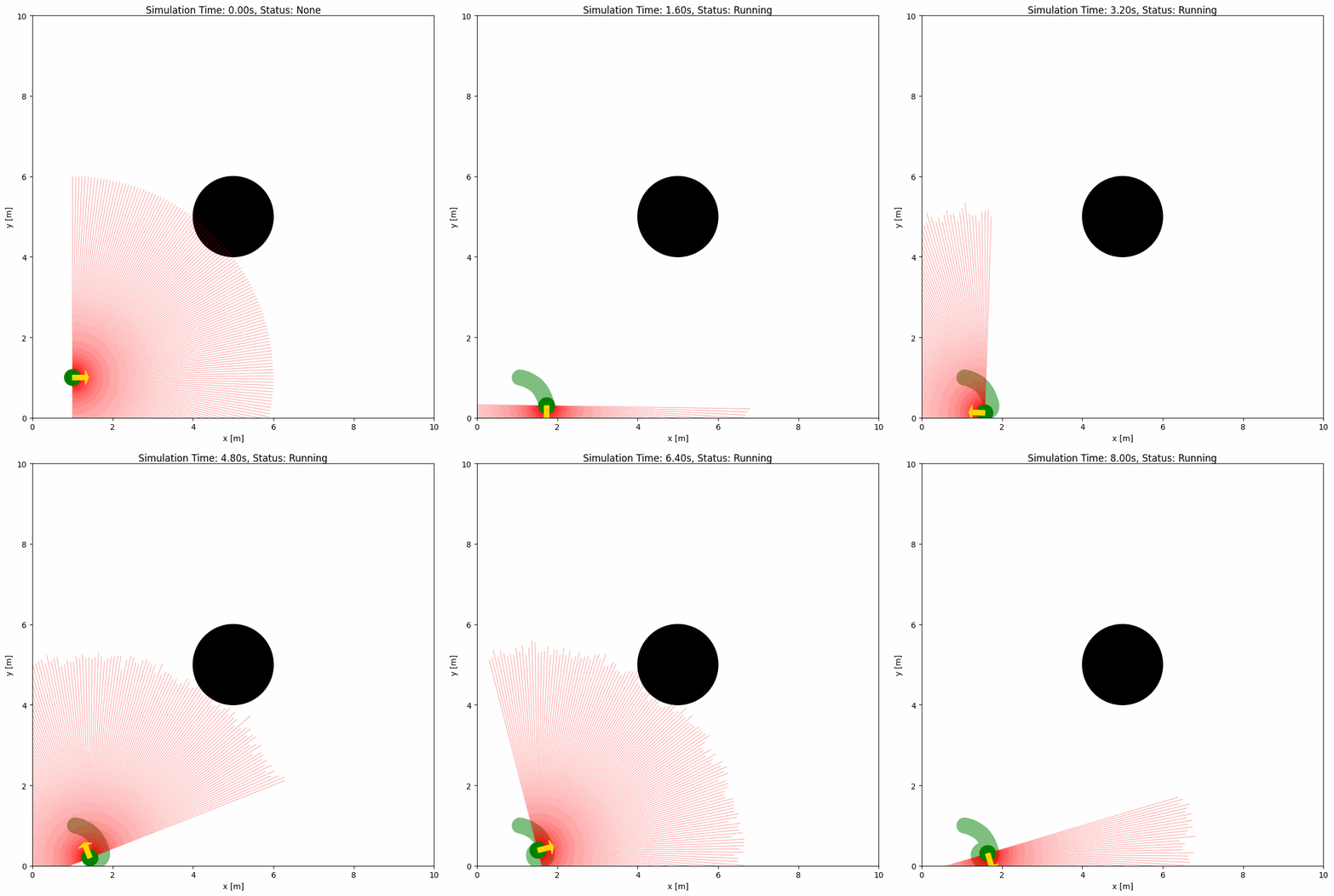
Gaussian noise is added to the LiDAR sensor with the std and angle_std parameters. The std parameter is the standard deviation of the range noise, and the angle_std parameter is the standard deviation of the angle noise.
FMCW LiDAR Configuration Parameters#
IR-SIM also provides a simplified 2D FMCW LiDAR sensor named fmcw_lidar2d. It keeps the same beam geometry as the standard 2D LiDAR, but each valid beam additionally reports a scalar radial_velocity measurement. This makes it useful for demonstrating how Doppler measurements can help interpret dynamic obstacles.
The example below uses a stationary ego sensor with a forward 120-degree field of view and multiple moving obstacles. When plotting is enabled, valid returns are colorized by radial velocity and marked at their endpoints.
import irsim

env = irsim.make("fmcw_lidar_world.yaml")

for step in range(120):
    env.step()

    scan = env.get_lidar_scan()
    valid_count = int(scan["valid"].sum())
    valid_indices = scan["valid"].nonzero()[0]
    if len(valid_indices) > 0:
        beam_idx = max(valid_indices, key=lambda idx: abs(scan["radial_velocity"][idx]))
        print(
            f"step={step:03d} valid_beams={valid_count:03d} "
            f"beam={beam_idx:03d} range={scan['ranges'][beam_idx]:.3f} "
            f"radial_velocity={scan['radial_velocity'][beam_idx]:.3f}"
        )
    else:
        print(f"step={step:03d} valid_beams={valid_count:03d} no valid returns")

    env.render(0.05, mode="all")

env.end(3)
world:
  height: 10
  width: 10
  step_time: 0.1
  sample_time: 0.1
  offset: [0, 0]
  collision_mode: 'stop'
  control_mode: 'auto'

robot:
  - kinematics: {name: 'diff'}
    shape: {name: 'circle', radius: 0.2}
    state: [2.0, 5.0, 0.0]
    goal: [20.0, 5.0, 0.0]
    vel_min: [-2, -2.0]
    vel_max: [2, 2.0]
    behavior: {name: 'dash'}
    static: true

    sensors:
      - type: 'fmcw_lidar2d'
        range_min: 0.0
        range_max: 8.0
        angle_range: 2.0944   # 120 degrees
        number: 121           # approximately 1 degree per beam, including center beam
        motion_compensate: False
        noise: False
        offset: [0.0, 0.0, 0.0]
        plot:
          alpha: 0.8
          color: 'cyan'
          velocity_linewidth: 2.0
          no_hit_linewidth: 0.25
          no_hit_alpha: 0.01
          show_velocity_markers: True
          velocity_marker_size: 45
          velocity_marker_edge_color: 'black'
          velocity_marker_edge_width: 0.5
          zero_velocity_color: 'cyan'
          positive_velocity_color: 'red'
          negative_velocity_color: 'blue'
          velocity_color_max: 0.6

obstacle:
  - kinematics: {name: 'omni'}
    shape: {name: 'circle', radius: 0.25}
    state: [8.0, 5.0, 0.0]
    goal: [3.0, 5.0, 0.0]
    vel_min: [-0.8, -0.8]
    vel_max: [0.8, 0.8]
    behavior: {name: 'dash'}
    color: 'orangered'
    plot: {show_goal: True}

  - kinematics: {name: 'omni'}
    shape: {name: 'circle', radius: 0.22}
    state: [7.5, 6.8, 0.0]
    goal: [3.2, 4.8, 0.0]
    vel_min: [-0.4, -0.4]
    vel_max: [0.4, 0.4]
    behavior: {name: 'dash'}
    color: 'gold'
    plot: {show_goal: True}

  - kinematics: {name: 'omni'}
    shape: {name: 'circle', radius: 0.20}
    state: [8.6, 3.8, 0.0]
    goal: [3.5, 5.6, 0.0]
    vel_min: [-1.2, -1.2]
    vel_max: [1.2, 1.2]
    behavior: {name: 'dash'}
    color: 'limegreen'
    plot: {show_goal: True}

  - kinematics: {name: 'omni'}
    shape: {name: 'circle', radius: 0.24}
    state: [6.8, 7.6, 0.0]
    goal: [4.6, 6.4, 0.0]
    vel_min: [-0.2, -0.2]
    vel_max: [0.2, 0.2]
    behavior: {name: 'dash'}
    color: 'mediumorchid'
    plot: {show_goal: True}
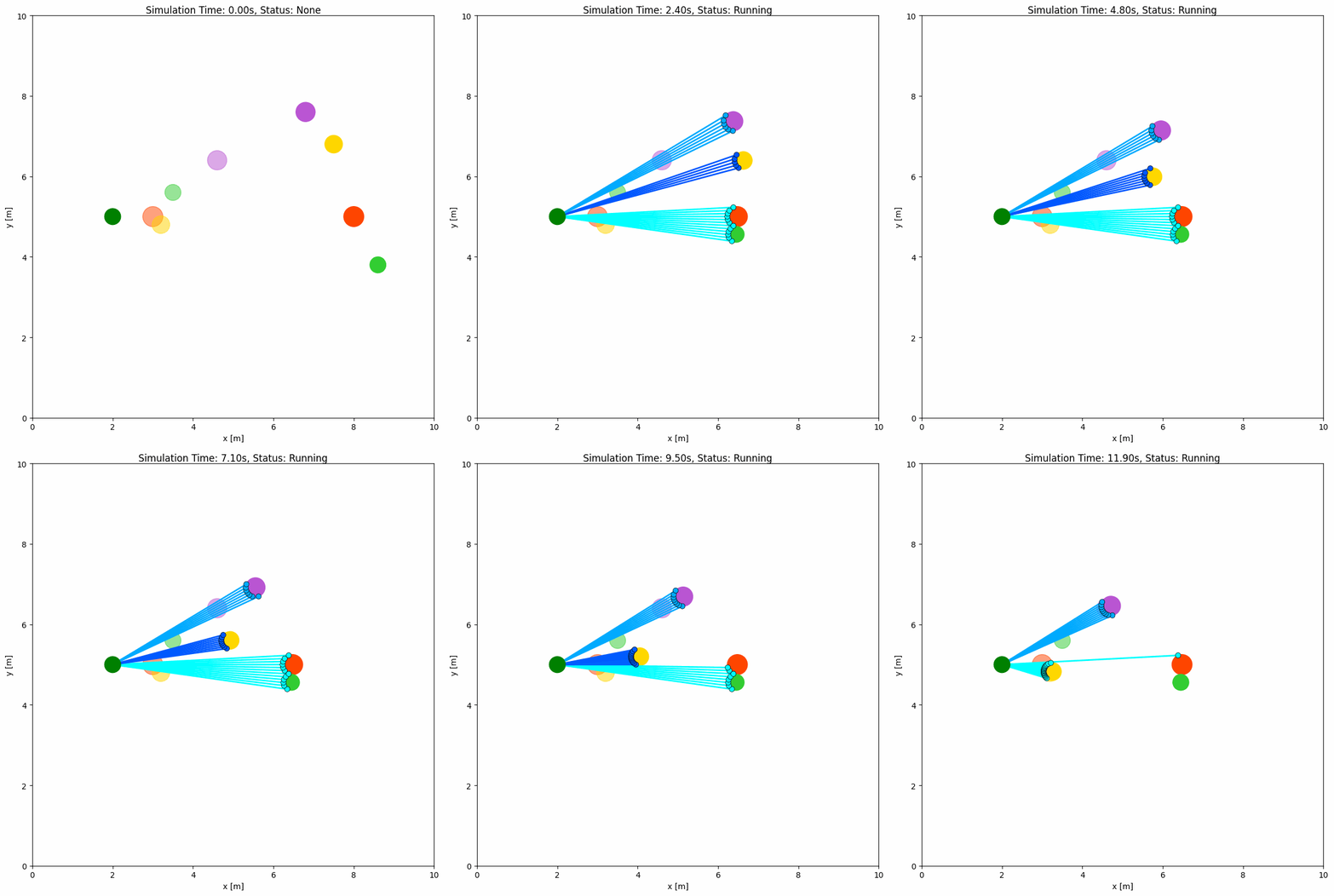
Key FMCW-specific parameters are:
motion_compensate: Whether to remove ego-motion from the measured radial velocity.
velocity_noise_std: Standard deviation of Gaussian noise applied to
radial_velocity.
Visualization parameters live under the sensor’s plot: sub-dict (consistent with lidar2d and object plot:); flat top-level keys are still accepted for backward compatibility:
velocity_color: Whether to colorize valid beams by radial velocity during plotting.
velocity_color_max: Velocity magnitude where the plotting color saturates.
The returned scan keeps the standard LiDAR angle metadata and adds:
radial_velocity: Scalar radial velocity for each beam.
valid: Whether the beam has a valid return within
range_max.
The complete runnable example is available under usage/22fmcw_lidar_world/.
FOV Configuration Parameters#
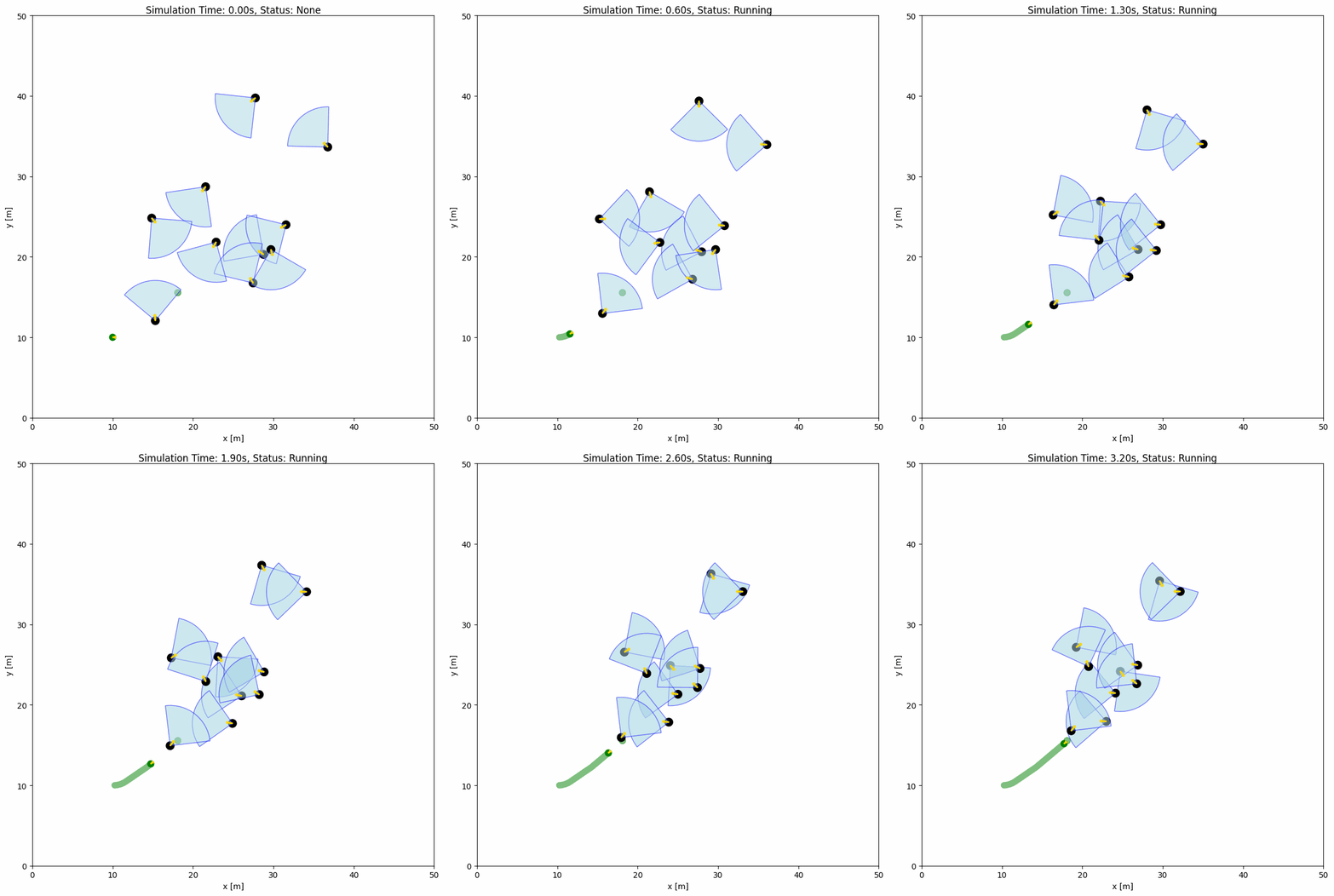
The YAML configuration file and Python Script below shows an example of objects within the field of view (FOV). The FOV is defined by the fov (float) and fov_radius (float) parameters in the object configuration. Each object has a FOV that can detect the robot within the FOV by the function fov_detect_object().
import irsim

env = irsim.make()

for i in range(200):

    env.step()

    for obs in env.obstacle_list:
        if obs.fov_detect_object(env.robot):
            print(f'The robot is in the FOV of the {obs.name}. The parameters of this obstacle are: state [x, y, theta]: {obs.state.flatten()}, velocity [linear, angular]: {obs.velocity.flatten()}, fov in radian: {obs.fov}.')

    env.render(figure_kwargs={'dpi': 100})

env.end()
world:
  height: 50
  width: 50
  step_time: 0.1
  sample_time: 0.1
  offset: [0, 0]
  collision_mode: 'stop'
  control_mode: 'auto'

robot:
  - kinematics: {name: 'diff'}  # omni, diff, acker
    shape: {name: 'circle', radius: 0.4}
    state: [10, 10, 0, 0]
    goal: [45, 45, 0]
    goal_threshold: 0.4
    vel_max: [3, 1]
    vel_min: [-3, -1]
    behavior: {name: 'dash', wander: True, range_low: [15, 15, -3.14], range_high: [35, 35, 3.14]}
    plot:
        show_goal: True
        show_trajectory: True

obstacle:
  - number: 10
    distribution: {name: 'random', range_low: [10, 10, -3.14], range_high: [40, 40, 3.14]}
    kinematics: {name: 'diff'}
    behavior: {name: 'rvo', vxmax: 1.5, vymax: 1.5, acce: 1.0, factor: 2.0, mode: 'vo', wander: True, range_low: [15, 15, -3.14], range_high: [35, 35, 3.14], target_roles: 'all'}
    vel_max: [3, 3.14]
    vel_min: [-3, -3.14]
    shape:
      - {name: 'circle', radius: 0.5}  # radius
    fov: 1.57
    fov_radius: 5.0
    plot:
      show_fov: True
      show_arrow: True
      arrow_length: 0.8