为机器人配置传感器#
LiDAR 配置参数#
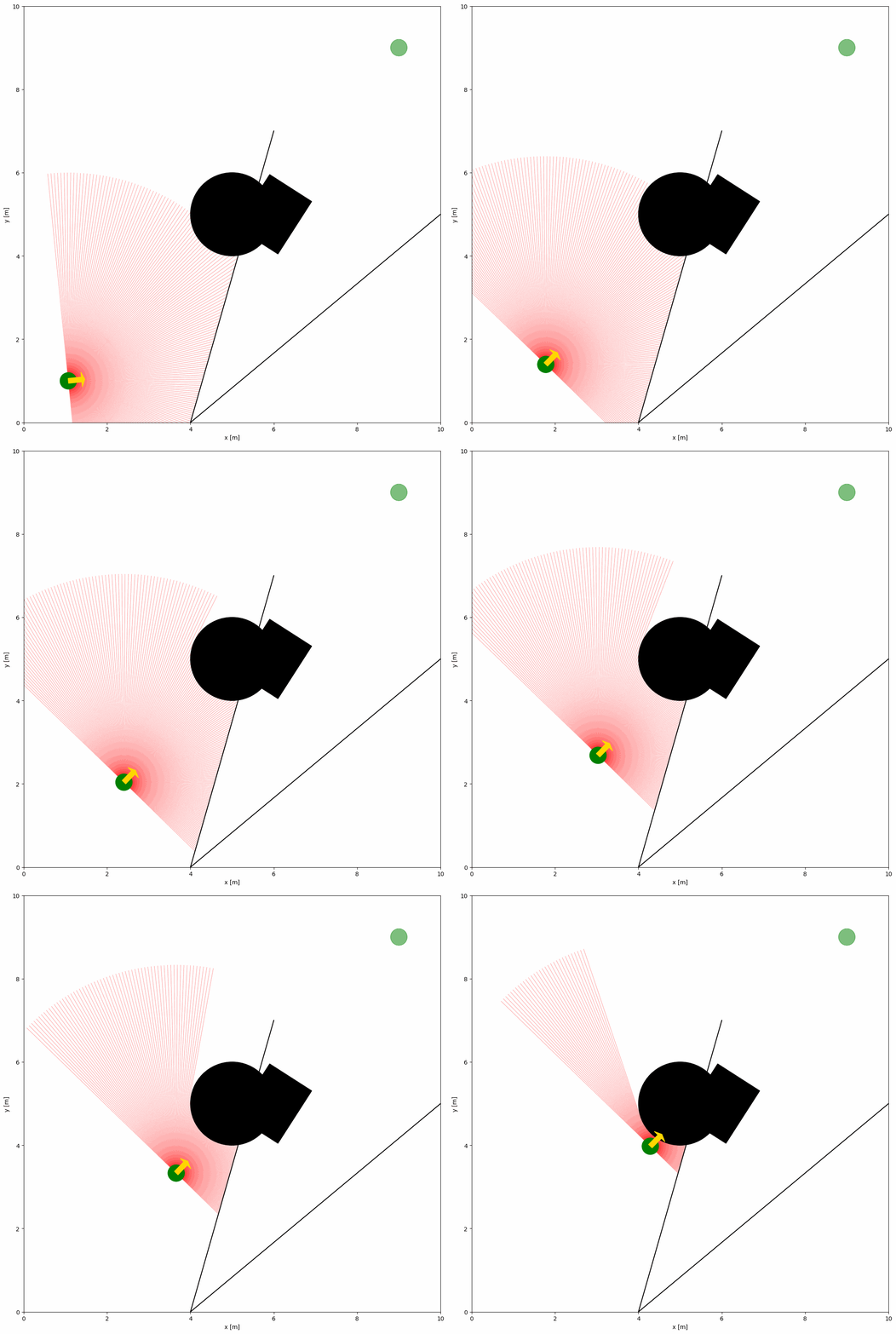
下面的 YAML 配置与 Python 脚本展示了带 2D LiDAR 传感器的机器人示例:
import irsim

env = irsim.make()

for i in range(1000):

    env.step()
    env.render(0.05)

    if env.done():
        break

env.end()
与 Python 脚本同名的 YAML 文件:
world:
  height: 10
  width: 10

robot:
  - kinematics: {name: 'diff'}  # omni, diff, acker
    shape: {name: 'circle', radius: 0.2}  # radius
    goal: [9, 9, 0]

    sensors:
      - name: 'lidar2d'
        range_min: 0
        range_max: 5
        angle_range: 3.14
        number: 200
        noise: False
        alpha: 0.3

obstacle:
  - shape: {name: 'circle', radius: 1.0}  # radius
    state: [5, 5, 0]

  - shape: {name: 'rectangle', length: 1.5, width: 1.2}  # length, width
    state: [6, 5, 1]

  - shape: {name: 'linestring', vertices: [[10, 5], [4, 0], [6, 7]]}  # vertices
    state: [0, 0, 0]
小技巧
更新顺序
环境会在所有对象完成该时间步移动后再更新传感器,从而避免读数的时间偏差。若手动控制对象,请在 ObjectBase.step(...) 中传入 sensor_step=True,或在更新对象状态后调用 obj.sensor_step()。
关键参数说明
若要配置 2D LiDAR,需在机器人 sensors 部分定义名为 lidar2d 的传感器。主要参数如下:
range_min:激光束的最小量程。
range_max:激光束的最大量程。
angle_range:激光束覆盖的角度范围。
number:束数量。
alpha:激光束透明度。
完整参数列表见 YAML 配置。
带噪声的高级 LiDAR 配置
若需为 LiDAR 添加噪声,可将 noise 设为 True。
import irsim

env = irsim.make()

for i in range(1000):

    env.step()
    env.render(0.05)

    if env.done():
        break

env.end()
world:
  height: 10
  width: 10

robot:
  - kinematics: {name: 'diff'}  # omni, diff, acker
    shape: {name: 'circle', radius: 0.2}  # radius
    goal: [9, 9, 0]

    sensors:
      - name: 'lidar2d'
        range_min: 0
        range_max: 5
        angle_range: 3.14 #  4.7123
        number: 200
        noise: True
        std: 0.1
        angle_std: 0.2
        offset: [0, 0, 0]
        alpha: 0.3

obstacle:
  - shape: {name: 'circle', radius: 1.0}  # radius
    state: [5, 5, 0]

  - shape: {name: 'rectangle', length: 1.5, width: 1.2}  # length, width
    state: [6, 5, 1]

  - shape: {name: 'linestring', vertices: [[10, 5], [4, 0], [6, 7]]}  # vertices
    state: [0, 0, 0]
通过 std 与 angle_std 参数为 LiDAR 添加高斯噪声。其中 std 为距离噪声的标准差,angle_std 为角度噪声的标准差。
视场(FOV)配置参数
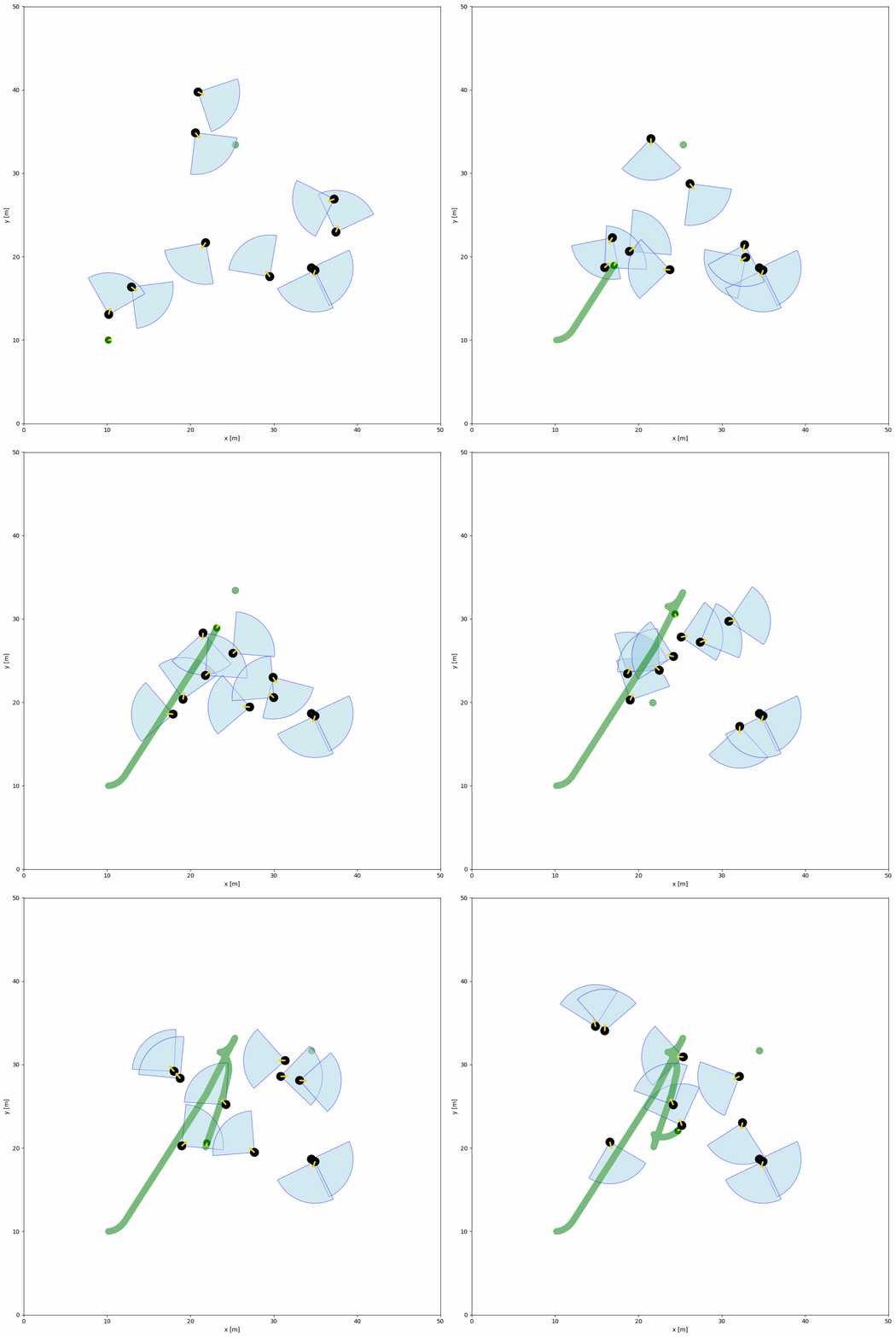
下方的 YAML 配置与 Python 脚本展示了 FOV 中的对象示例。FOV 由对象配置中的 fov(角度)与 fov_radius(半径)参数定义。每个对象都拥有 FOV,可通过 fov_detect_object() 检测视场内的机器人。
import irsim

env = irsim.make()

for i in range(200):

    env.step()

    for obs in env.obstacle_list:
        if obs.fov_detect_object(env.robot):
            print(f'The robot is in the FOV of the {obs.name}. The parameters of this obstacle are: state [x, y, theta]: {obs.state.flatten()}, velocity [linear, angular]: {obs.velocity.flatten()}, fov in radian: {obs.fov}.')

    env.render(figure_kwargs={'dpi': 100})

env.end()
world:
  height: 50
  width: 50
  step_time: 0.1
  sample_time: 0.1
  offset: [0, 0]
  collision_mode: 'stop'
  control_mode: 'auto'

robot:
  - kinematics: {name: 'diff'}  # omni, diff, acker
    shape: {name: 'circle', radius: 0.4}
    state: [10, 10, 0, 0]
    goal: [45, 45, 0]
    goal_threshold: 0.4
    vel_max: [3, 1]
    vel_min: [-3, -1]
    behavior: {name: 'dash', wander: True, range_low: [15, 15, -3.14], range_high: [35, 35, 3.14]}
    plot:
        show_goal: True
        show_trajectory: True

obstacle:
  - number: 10
    distribution: {name: 'random', range_low: [10, 10, -3.14], range_high: [40, 40, 3.14]}
    kinematics: {name: 'diff'}
    behavior: {name: 'rvo', vxmax: 1.5, vymax: 1.5, acce: 1.0, factor: 2.0, mode: 'vo', wander: True, range_low: [15, 15, -3.14], range_high: [35, 35, 3.14], target_roles: 'all'}
    vel_max: [3, 3.14]
    vel_min: [-3, -3.14]
    shape:
      - {name: 'circle', radius: 0.5}  # radius
    fov: 1.57
    fov_radius: 5.0
    plot:
      show_fov: True
      show_arrow: True
      arrow_length: 0.8