为对象配置行为#
仿真中的每个对象都可以独立指定行为以模拟不同场景。通过在 YAML 配置文件中设置行为参数即可完成配置。
IR-SIM 支持两种行为配置类型:
behavior:控制单个对象的运动(如dash、rvo、sfm)group_behavior:协调群组中所有对象的行为(如orca)
行为配置参数#
内置的个体行为包括 dash(直接朝目标移动)、rvo(互惠速度障碍,用于多智能体避障)以及 sfm(社会力模型——反应式行人风格避障)。默认情况下,移动对象没有行为,会保持静止,除非外部下发控制指令。
行为按机动学注册,并非每一种(机动学,行为)组合都存在:
机动学 |
可用行为 |
|---|---|
|
|
|
|
|
|
|
|
若为某种机动学指定了未注册的行为(例如给 acker 指定 rvo),对象构造将报错。如需补足缺失组合,请使用自定义行为。
下面示例展示了 RVO 行为:
import irsim

env = irsim.make()

for i in range(1000):

    env.step()
    env.render(0.05)

    if env.done():
        break

env.end()
world:
  height: 10  # the height of the world
  width: 10   # the width of the world

robot:
  - number: 10
    distribution: {name: 'circle', radius: 4.0, center: [5, 5]}
    kinematics: {name: 'diff'}
    shape:
      - {name: 'circle', radius: 0.2}
    behavior: {name: 'rvo', vxmax: 1.5, vymax: 1.5, acce: 1.0, factor: 1.0}
    vel_min: [-3, -3.0]
    vel_max: [3, 3.0]
    color: ['royalblue', 'red', 'green', 'orange', 'purple', 'yellow', 'cyan', 'magenta', 'lime', 'pink', 'brown']
    arrive_mode: position
    goal_threshold: 0.15
    plot:
      show_trail: true
      show_goal: true
      trail_fill: true
      trail_alpha: 0.2
      show_trajectory: false
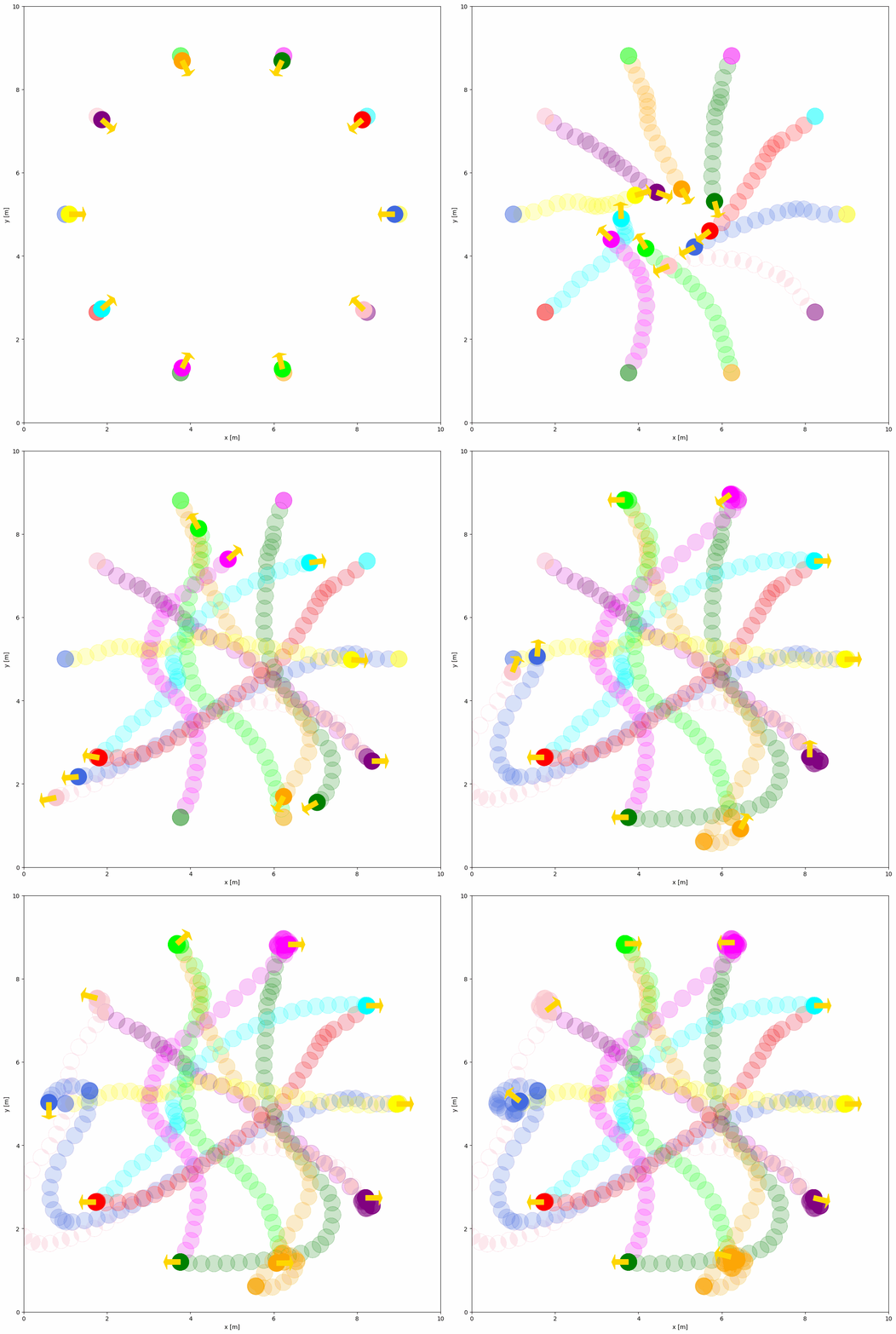
关键行为参数说明#
通用参数:
name: 行为类型('dash'、'rvo'、'sfm'或自定义名称)wander: 抵达当前目标后是否随机生成下一个目标(默认False)loop: 抵达最后一个目标点后是否循环导航所有路径点(默认False)target_roles: 行为作用对象筛选('all'、'robot'、'obstacle')
RVO 专用参数:
vxmax/vymax: x/y 方向最大速度(默认1.5)acce: 最大加速度(默认1.0)factor: 碰撞惩罚权重(默认1.0,越大越保守)mode: 算法模式——'rvo'(默认)、'hrvo'或'vo'neighbor_threshold: 邻近目标检测范围(默认3.0米)
SFM 专用参数(各向异性的 Moussaid-Helbing 2009 变体):
vmax: 力积分后施加的速度上限(默认1.5)neighbor_threshold: 社会力交互的距离截断(默认10.0)relaxation_time: 目标牵引时间常数tau(默认0.5)force_factor_desired: 目标牵引力权重(默认1.0)force_factor_social: 智能体间互斥力权重(默认2.1)force_factor_obstacle: 障碍物互斥力权重(默认10.0)sigma_obstacle: 障碍物力的指数衰减长度(默认0.8)lambda_importance: 在交互方向上速度相对位置的权重(默认2.0)gamma: 决定交互范围B = gamma * ||t||(默认0.35)n_angular/n_velocity: 侧向力与减速力的角度锐度指数(默认分别为2.0、3.0)
Dash 专用参数:
angle_tolerance:diff/acker机动学对准方向的容差(默认0.1弧度)
完整的行为参数列表请参见 YAML 配置。
SFM(社会力模型)#
sfm 是一种反应式避障行为,将每个智能体视为受三种力作用的牛顿粒子——目标牵引力、各向异性的邻居互斥力(位于智能体运动方向上的人产生的反作用力强于身后的人),以及指数衰减的障碍物互斥力。实现采用 Moussaid、Helbing 等人 (2009) 提出的各向异性变体。
sfm 与 rvo/orca 互为补充:RVO 与 ORCA 是几何方法,在其假设下可证明无碰撞,而 SFM 是行为方法,生成更接近真人的轨迹——包括偶发的擦碰、犹豫,以及对前后邻居不对称的反应。需要群体真实感时使用 SFM;以无碰撞为优先时使用 RVO/ORCA。
下面的示例为 usage/23sfm_world/sfm_world.yaml:24 个行人穿越由两条 6.6 m 走廊构成的 + 字形交叉口。每条车道承载一对相向通行的行人(东西向蓝/红,南北向绿/橙),L 形墙角作为线段障碍进入 SFM,使行人沿墙弯绕而非切角通过。
备注
请将 YAML 配置文件与主 Python 脚本放在同一目录下。
import irsim

env = irsim.make()

while not env.done():
    env.step()
    env.render(0.01)

env.end()
world:
  height: 20
  width: 20
  step_time: 0.1
  offset: [-10, -10]
  collision_mode: 'unobstructed'   # SFM is reactive; allow brief overlap
  control_mode: 'auto'

robot:
  - number: 24
    distribution: {name: 'manual'}
    kinematics: {name: 'diff'}
    shape: [{name: 'circle', radius: 0.25}]
    # 12 horizontal head-on pairs + 12 vertical head-on pairs, interleaved
    # so adjacent indices share a lane (ir-sim steps objects sequentially,
    # so the pair coupling depends on adjacency in env.objects).
    state:
      - [-9, -2.6, 0]
      - [ 9, -2.601, 3.14]
      - [-9, -1.6, 0]
      - [ 9, -1.601, 3.14]
      # ... (six horizontal lanes + six vertical lanes, see usage file)
    goal:
      - [ 9, -2.6, 0]
      - [-9, -2.601, 3.14]
      - [ 9, -1.6, 0]
      - [-9, -1.601, 3.14]
      # ...
    color:
      - 'royalblue'   # W->E
      - 'red'         # E->W
      # ... (alternating blue/red horizontally, green/orange vertically)
    behavior:
      name: 'sfm'
      loop: true
      vmax: 0.7
      neighbor_threshold: 5.0
      force_factor_social: 6.0
      force_factor_obstacle: 8.0       # walls must hold during loop-reset
      lambda_importance: 1.0           # cleaner repulsion along line of centres
      gamma: 0.5
      sigma_obstacle: 0.6              # wall felt across most of the 6.6 m corridor
      n_angular: 1.5                   # agents commit to a side earlier
      n_velocity: 2.5
      safety_radius: 0.12              # 0.24 m personal bubble
    vel_min: [-1.5, -3.0]
    vel_max: [ 1.5,  3.0]
    arrive_mode: position
    goal_threshold: 1.0                # loop-reset fires before the wall stalls the goal approach
    plot: {show_trail: true, show_goal: true, trail_fill: true, trail_alpha: 0.2, keep_trail_length: 25}

obstacle:
  - number: 4
    distribution: {name: 'manual'}
    state: [0, 0, 0]
    unobstructed: true
    shape:
      - {name: 'linestring', vertices: [[-10,  3.3], [-3.3,  3.3], [-3.3,  10]]}
      - {name: 'linestring', vertices: [[ 10,  3.3], [ 3.3,  3.3], [ 3.3,  10]]}
      - {name: 'linestring', vertices: [[-10, -3.3], [-3.3, -3.3], [-3.3, -10]]}
      - {name: 'linestring', vertices: [[ 10, -3.3], [ 3.3, -3.3], [ 3.3, -10]]}
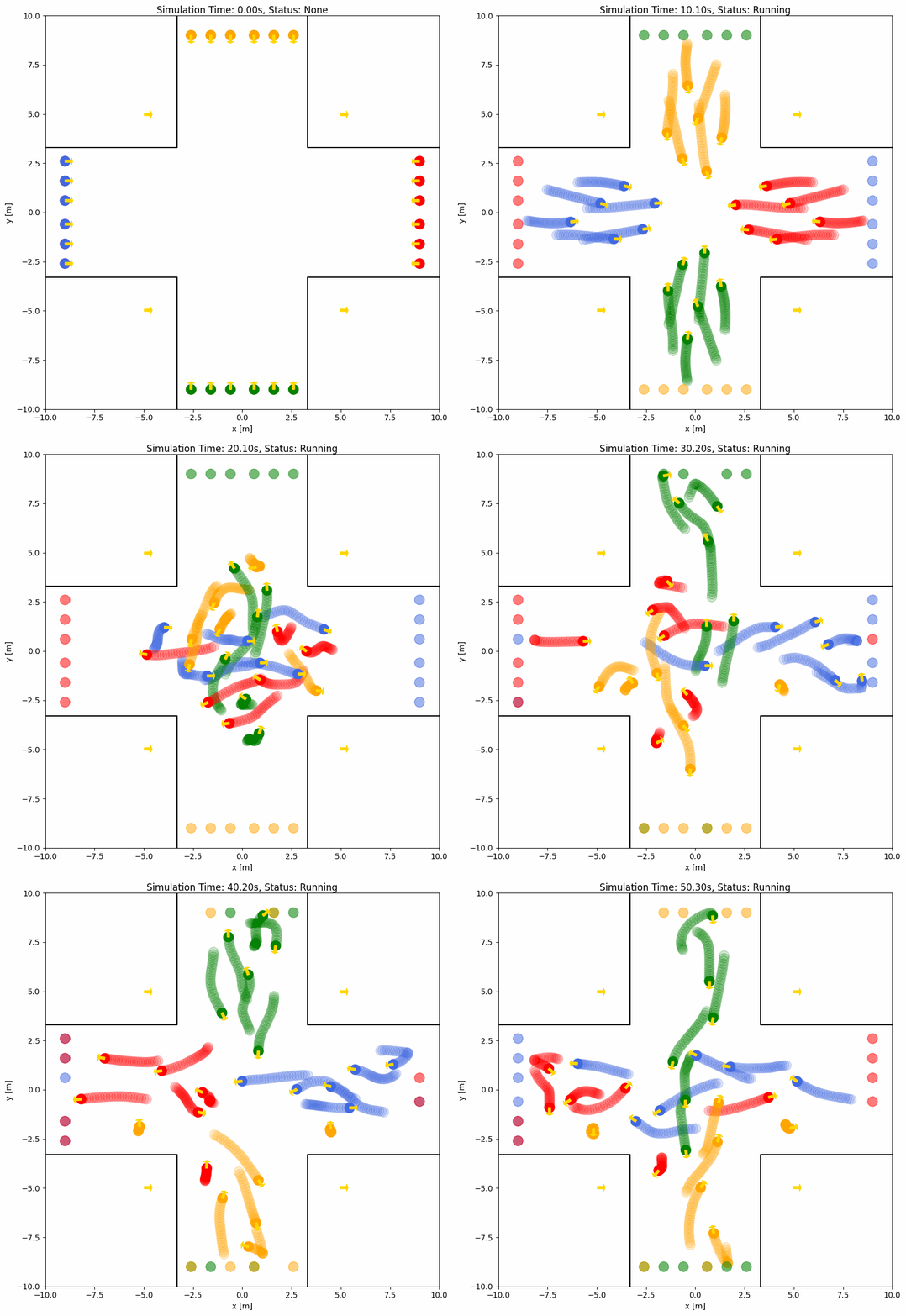
完整可运行示例见 usage/23sfm_world/(24 个行人的交叉走廊场景,以及另一对相向通行的机器人示例)。
RVO 与线段障碍物#
rvo 除了避让圆形智能体之外,还会自动避让 linestring 形状的障碍物。linestring 对象中相邻顶点之间的每一段线段都会被视为静态速度障碍,因此 RVO 智能体无需额外配置即可绕开墙体或折线:
robot:
  - number: 6
    kinematics: {name: 'diff'}
    shape: {name: 'circle', radius: 0.2}
    distribution: {name: 'circle', radius: 4.0, center: [5, 5]}
    behavior: {name: 'rvo'}

obstacle:
  - shape: {name: 'linestring', vertices: [[2, 2], [2, 8], [8, 8]]}
该机制对 omni 与 diff 机动学都生效;非 linestring 障碍物仍按邻居智能体参与计算。
群组行为#
behavior 控制单个对象的运动,而 group_behavior 则用于协调同一群组内所有对象的行为。群组行为在单步计算中为所有成员生成动作,比逐个计算个体行为更高效。
行为与群组行为对比#
特性 |
|
|
|---|---|---|
作用域 |
单个对象 |
群组中的所有对象 |
计算方式 |
每步逐对象计算 |
一次性计算所有成员 |
使用场景 |
简单导航 |
多智能体协调 |
可用行为 |
|
|
ORCA(最优互惠碰撞避免)#
ORCA 是一种经典的内置群组级碰撞避免算法,可同时为多个智能体计算最优速度。即使有数百个智能体,也能确保平滑无碰撞的导航。
备注
ORCA 需要 pyrvo 库,它是 ORCA C++ 算法的 Python 绑定。使用以下命令安装:
pip install pyrvo
基本 ORCA 配置#
import irsim

env = irsim.make()

while True:
    env.step()
    env.render()

    if env.done():
        break

env.end()
world:
  height: 290
  width: 290
  step_time: 0.1
  sample_time: 0.7
  offset: [-140, -140]

robot:
  - number: 200
    kinematics: {name: 'omni'}
    shape: {name: 'circle', radius: 1.0}
    distribution: {name: 'circle', radius: 140}
    color: 'g'
    goal_threshold: 0.1
    vel_max: [3, 3]
    vel_min: [-3, -3]
    plot:
      show_trajectory: True
      show_goal: True
      keep_traj_length: 50
    group_behavior:
      name: 'orca'
      neighborDist: 15.0
      maxNeighbors: 10
      timeHorizon: 20.0
      timeHorizonObst: 10.0
      safe_radius: 0.5
      maxSpeed: 2.0
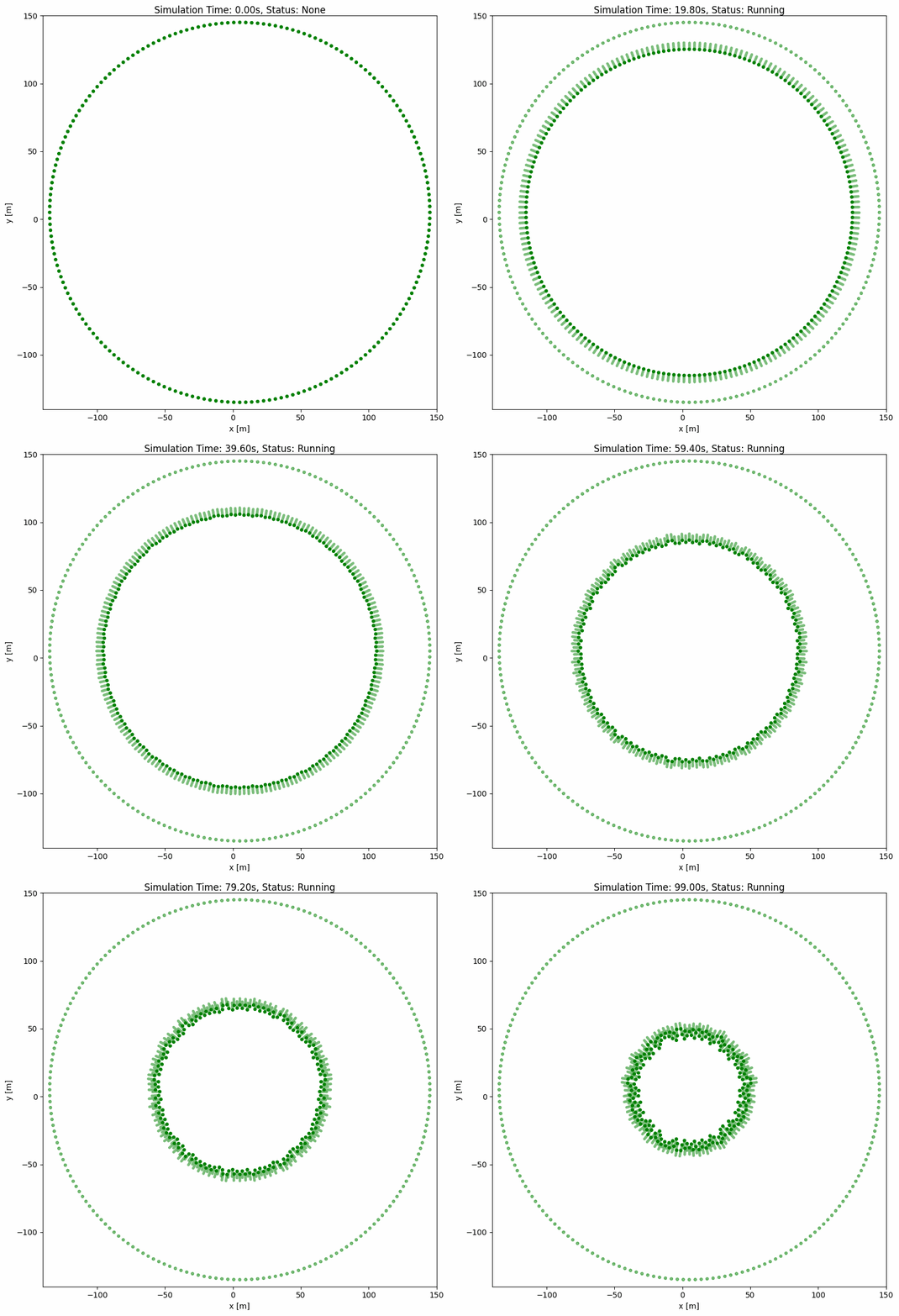
ORCA 参数说明#
参数 |
类型 |
默认值 |
描述 |
|---|---|---|---|
|
|
- |
必须为 |
|
|
|
将其他智能体视为邻居的最大距离 |
|
|
|
碰撞避免考虑的最大邻居数量 |
|
|
|
智能体间碰撞避免的时间视野(秒) |
|
|
|
智能体与障碍物碰撞避免的时间视野(秒) |
|
|
|
添加到智能体半径的额外安全边距 |
|
|
无 |
最大速度覆盖值(未设置时使用机器人的 |
|
|
|
到达当前目标时生成随机目标 |
|
|
|
抵达最后一个目标点后循环导航所有路径点 |
|
|
- |
随机目标生成的下界 |
|
|
- |
随机目标生成的上界 |
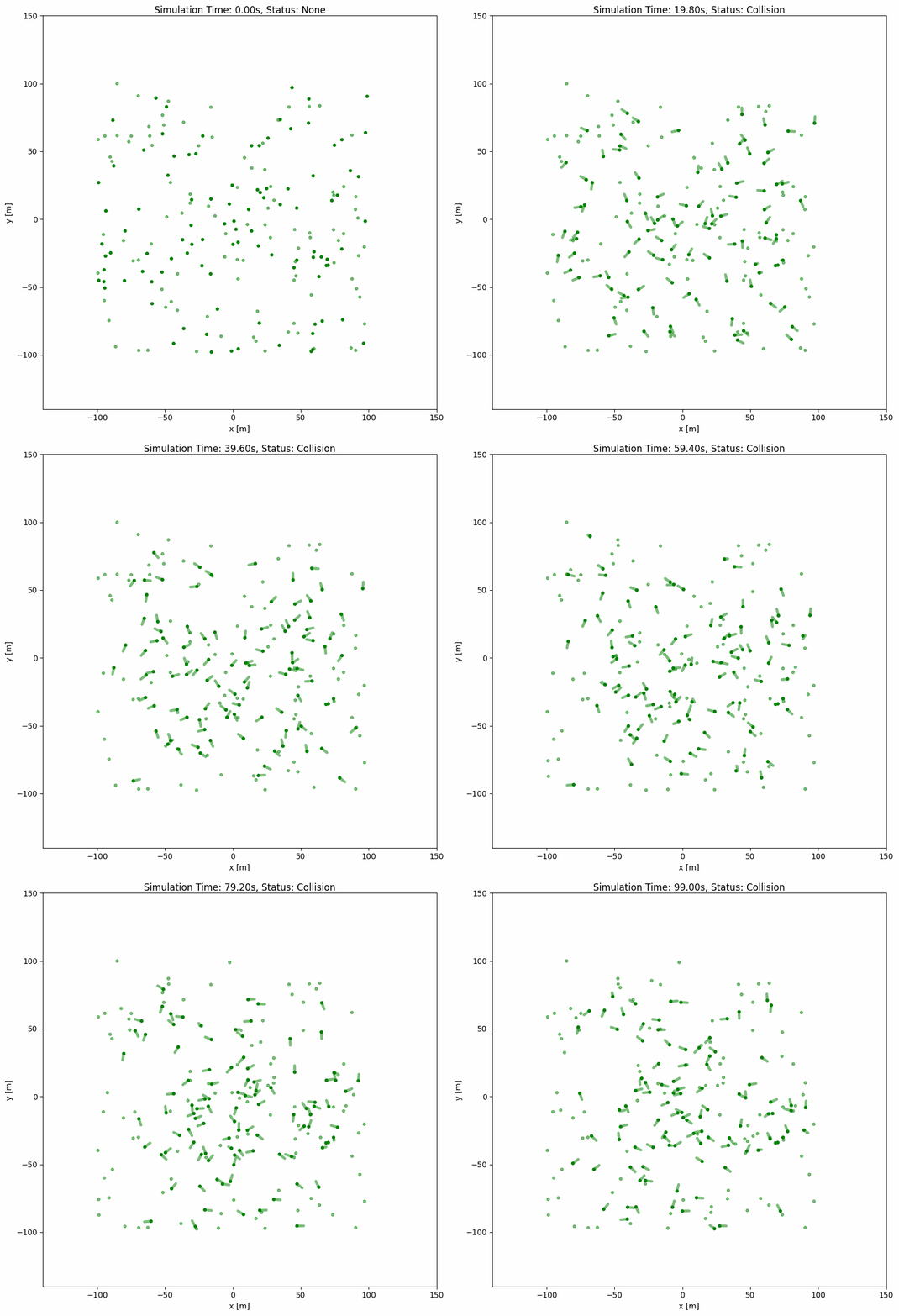
带随机漫游的 ORCA#
用于智能体到达目标后继续移动的持续仿真:
import irsim

env = irsim.make()

for i in range(1000):
    env.step()
    env.render()

    if env.done():
        break

env.end()
world:
  height: 290
  width: 290
  step_time: 0.1
  sample_time: 0.7
  offset: [-140, -140]

robot:
  - number: 100
    kinematics: {name: 'omni'}
    shape: {name: 'circle', radius: 1.0}
    distribution: {name: 'random', range_low: [-100, -100, -3.14], range_high: [100, 100, 3.14]}
    color: 'g'
    goal_threshold: 0.1
    vel_max: [3, 3]
    vel_min: [-3, -3]
    plot:
      show_trajectory: True
      show_goal: True
      keep_traj_length: 50
    group_behavior:
      name: 'orca'
      neighborDist: 15.0
      maxNeighbors: 10
      timeHorizon: 20.0
      timeHorizonObst: 10.0
      safe_radius: 0.5
      maxSpeed: 2.0
      wander: True
      range_low: [-100, -100, -3.14]
      range_high: [100, 100, 3.14]
自定义群组行为#
你可以创建自定义群组行为以实现多智能体协调控制。IR-SIM 提供两种注册模式:
@register_group_behavior:基于函数(每步调用)@register_group_behavior_class:基于类(初始化一次,然后每步调用)
基于函数与基于类的行为对比#
方面 |
基于函数 |
基于类 |
|---|---|---|
装饰器 |
|
|
初始化 |
无(无状态) |
启动时执行一次 |
状态 |
无持久状态 |
可在步骤间保持状态 |
使用场景 |
简单计算 |
需要初始化的复杂算法 |
示例 |
简单编队控制 |
ORCA(需要仿真器设置) |
自定义群组行为示例(基于类)#
以下是一个实现简单编队控制的自定义群组行为示例:
# custom_group_methods.py
from typing import Any
import numpy as np
from irsim.lib.behavior.behavior_registry import register_group_behavior_class
from irsim.world.object_base import ObjectBase


@register_group_behavior_class("omni", "formation")
def init_formation_behavior(members: list[ObjectBase], **kwargs: Any):
    """Registered initializer returning a class-based handler."""
    return FormationGroupBehavior(members, **kwargs)


class FormationGroupBehavior:
    """
    Class-based formation group behavior.
    Maintains formation shape while moving toward goals.
    """

    def __init__(
        self,
        members: list[ObjectBase],
        formation_gain: float = 1.0,
        goal_gain: float = 0.5,
        **kwargs: Any,
    ) -> None:
        """
        Initialize formation behavior.

        Args:
            members: List of group members
            formation_gain: Weight for formation keeping
            goal_gain: Weight for goal reaching
        """
        self._formation_gain = formation_gain
        self._goal_gain = goal_gain

        # Calculate initial formation offsets (relative positions)
        if members:
            centroid = np.mean([m.state[:2, 0] for m in members], axis=0)
            self._offsets = [m.state[:2, 0] - centroid for m in members]
        else:
            self._offsets = []

    def __call__(
        self, members: list[ObjectBase], **kwargs: Any
    ) -> list[np.ndarray]:
        """
        Generate velocities for all members to maintain formation.

        Args:
            members: Current group members
            **kwargs: Additional parameters

        Returns:
            List of velocity arrays for each member
        """
        if not members:
            return []

        velocities = []

        # Calculate current centroid
        centroid = np.mean([m.state[:2, 0] for m in members], axis=0)

        # Calculate target centroid (average of all goals)
        goals = [m.goal[:2, 0] for m in members if m.goal is not None]
        if goals:
            target_centroid = np.mean(goals, axis=0)
        else:
            target_centroid = centroid

        for i, member in enumerate(members):
            # Desired position in formation
            desired_pos = centroid + self._offsets[i] if i < len(self._offsets) else member.state[:2, 0]

            # Formation keeping velocity
            formation_vel = self._formation_gain * (desired_pos - member.state[:2, 0])

            # Goal reaching velocity
            goal_vel = self._goal_gain * (target_centroid - centroid)

            # Combined velocity
            vel = formation_vel + goal_vel

            # Clip to max speed
            speed = np.linalg.norm(vel)
            if speed > member.max_speed:
                vel = vel / speed * member.max_speed

            velocities.append(np.c_[vel])

        return velocities
使用自定义群组行为#
import irsim

env = irsim.make()
env.load_behavior("custom_group_methods")

for i in range(500):
    env.step()
    env.render()

    if env.done():
        break

env.end()
world:
  height: 20
  width: 20

robot:
  - number: 5
    kinematics: {name: 'omni'}
    shape: {name: 'circle', radius: 0.3}
    distribution: {name: 'circle', radius: 3, center: [10, 10]}
    color: 'blue'
    goal: [15, 15]
    vel_max: [2, 2]
    vel_min: [-2, -2]
    group_behavior:
      name: 'formation'
      formation_gain: 1.0
      goal_gain: 0.5
基于函数的群组行为示例#
对于无需初始化的简单行为:
# custom_group_methods.py
from typing import Any
import numpy as np
from irsim.lib.behavior.behavior_registry import register_group_behavior
from irsim.world.object_base import ObjectBase


@register_group_behavior("omni", "swarm")
def beh_omni_swarm(
    members: list[ObjectBase], **kwargs: Any
) -> list[np.ndarray]:
    """
    Simple swarm behavior - all members move toward group centroid.

    Args:
        members: List of group members
        **kwargs: Additional parameters (cohesion_gain, goal_gain)

    Returns:
        List of velocity arrays for each member
    """
    if not members:
        return []

    cohesion_gain = kwargs.get("cohesion_gain", 0.5)
    goal_gain = kwargs.get("goal_gain", 1.0)

    # Calculate centroid
    centroid = np.mean([m.state[:2, 0] for m in members], axis=0)

    velocities = []
    for member in members:
        # Cohesion: move toward centroid
        cohesion_vel = cohesion_gain * (centroid - member.state[:2, 0])

        # Goal: move toward individual goal
        if member.goal is not None:
            goal_vel = goal_gain * (member.goal[:2, 0] - member.state[:2, 0])
        else:
            goal_vel = np.zeros(2)

        vel = cohesion_vel + goal_vel

        # Clip to max speed
        speed = np.linalg.norm(vel)
        if speed > member.max_speed:
            vel = vel / speed * member.max_speed

        velocities.append(np.c_[vel])

    return velocities
重要
当行为需要初始化时使用
@register_group_behavior_class(如设置外部库、计算初始状态)对于简单的无状态行为使用
@register_group_behavior第一个参数是机动学类型(
'omni'、'omni_angular'、'diff'、'acker')第二个参数是在 YAML 中使用的行为名称
group_behavior: {name: 'your_name'}
自定义行为的高级配置#
自定义行为函数#
若希望为对象创建自定义行为,需先在自定义 Python 脚本(如 custom_behavior_methods.py)中定义行为,如下所示:
from irsim.lib import register_behavior
from irsim.util.util import relative_position, WrapToPi
import numpy as np

@register_behavior("diff", "dash_custom")
def beh_diff_dash(ego_object, objects, **kwargs):

    state = ego_object.state
    goal = ego_object.goal
    goal_threshold = ego_object.goal_threshold
    _, max_vel = ego_object.get_vel_range()
    angle_tolerance = kwargs.get("angle_tolerance", 0.1)

    behavior_vel = DiffDash2(state, goal, max_vel, goal_threshold, angle_tolerance)

    return behavior_vel


def DiffDash2(state, goal, max_vel, goal_threshold=0.1, angle_tolerance=0.2):

    distance, radian = relative_position(state, goal)

    if distance < goal_threshold:
        return np.zeros((2, 1))

    diff_radian = WrapToPi(radian - state[2, 0])
    linear = max_vel[0, 0] * np.cos(diff_radian)

    if abs(diff_radian) < angle_tolerance:
        angular = 0
    else:
        angular = max_vel[1, 0] * np.sign(diff_radian)

    return np.array([[linear], [angular]])
ego_object 表示需要控制的对象,objects 是仿真中的对象列表。自定义行为函数需返回对象的速度,并可从对象中获取状态、目标等属性。DiffDash2 就是一个计算冲刺速度的自定义行为函数。
重要
必须使用 @register_behavior 装饰器注册自定义行为。装饰器的第一个参数为机动学名称(diff、acker、omni、omni_angular),第二个参数为在 YAML 中引用的行为名称。
注册行为#
下方给出了运行自定义行为所需的 Python 脚本与 YAML。
import irsim

env = irsim.make()
env.load_behavior("custom_behavior_methods")

for i in range(1000):

    env.step()
    env.render(0.01)

    if env.done():
        break

env.end(5)
load_behavior 函数会从 Python 脚本中加载自定义行为方法。custom_behavior_methods 是包含自定义行为函数的脚本名称。
备注
请将名为 custom_behavior_methods 的脚本与主 Python 脚本放在同一目录下。
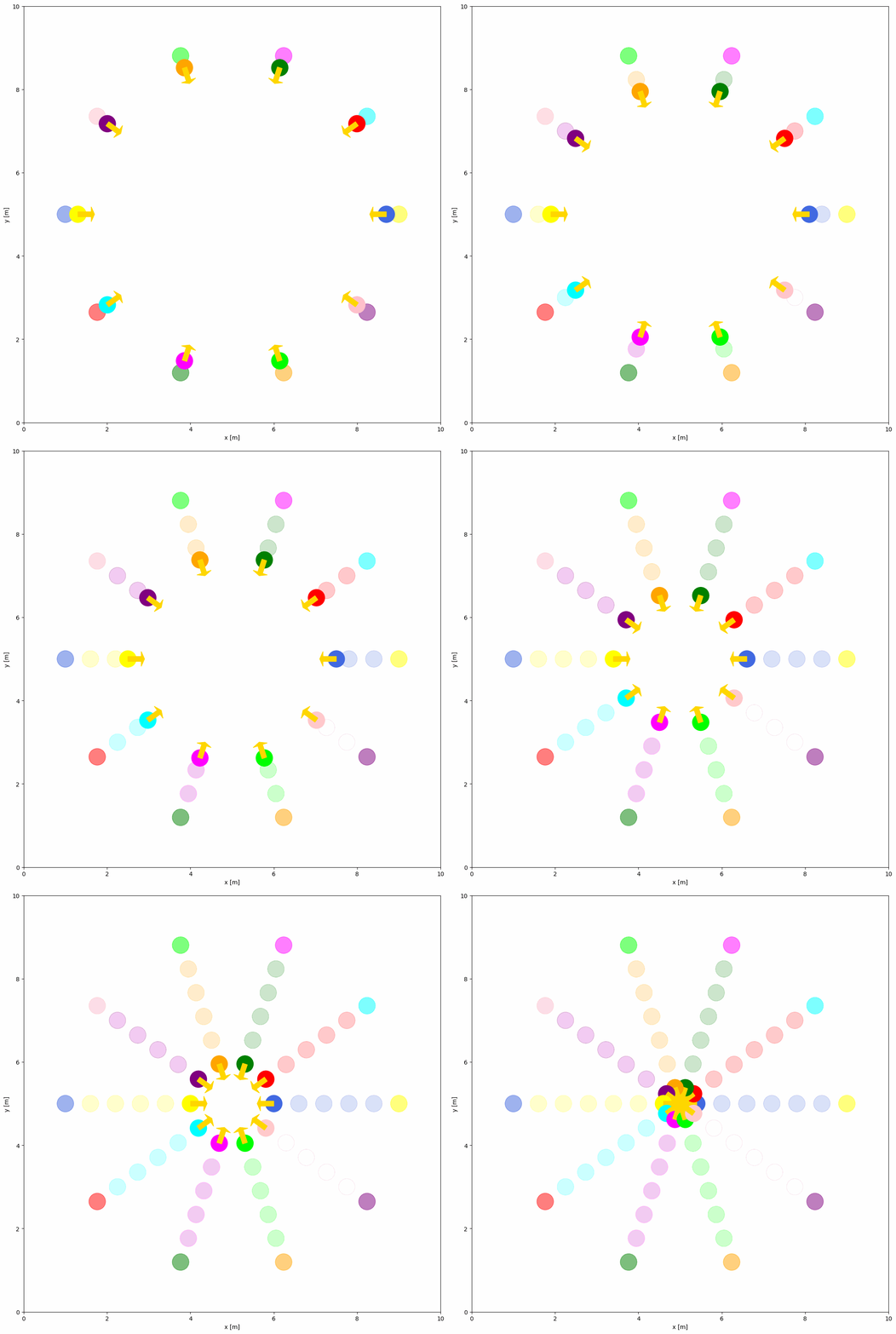
现在即可在 YAML 配置中使用自定义行为 dash_custom,如下所示。
world:
  height: 10  # the height of the world
  width: 10   # the width of the world

robot:
  - number: 10
    distribution: {name: 'circle', radius: 4.0, center: [5, 5]}
    kinematics: {name: 'diff'}
    shape:
      - {name: 'circle', radius: 0.2}
    behavior: {name: 'dash_custom'}
    vel_min: [-3, -3.0]
    vel_max: [3, 3.0]
    color: ['royalblue', 'red', 'green', 'orange', 'purple', 'yellow', 'cyan', 'magenta', 'lime', 'pink', 'brown']
    arrive_mode: position
    goal_threshold: 0.15
    plot:
      show_trail: true
      show_goal: true
      trail_fill: true
      trail_alpha: 0.2
      show_trajectory: false
自定义行为类(有状态)#
对于需要初始化或需要在步骤间保持状态的行为,请使用 @register_behavior_class 装饰器。适用场景包括:
行为需要一次性设置(如加载模型、初始化规划器)
需要在仿真步骤间跟踪历史或状态
希望缓存计算以提高效率
基于函数与基于类的个体行为对比#
方面 |
|
|
|---|---|---|
执行方式 |
每步调用 |
|
状态 |
无状态 |
可在步骤间保持状态 |
设置 |
无 |
在 |
使用场景 |
简单反应式行为 |
复杂规划器、基于学习的控制 |
基于类的行为示例#
# custom_behavior_methods.py
from typing import Any
import numpy as np
from irsim.lib.behavior.behavior_registry import register_behavior_class


@register_behavior_class("diff", "smooth_dash")
def init_smooth_dash(object_info, **kwargs):
    """Registered initializer returning a class-based handler."""
    return SmoothDashBehavior(object_info, **kwargs)


class SmoothDashBehavior:
    """
    Class-based smooth dash behavior with velocity smoothing.
    Maintains previous velocity for smooth acceleration.
    """

    def __init__(self, object_info, smoothing: float = 0.3, **kwargs):
        """
        Initialize smooth dash behavior.

        Args:
            object_info: Object information from ObjectBase
            smoothing: Smoothing factor (0-1), higher = smoother
        """
        self._smoothing = smoothing
        self._prev_vel = np.zeros((2, 1))
        self._object_info = object_info

    def __call__(
        self,
        ego_object,
        external_objects: list,
        **kwargs: Any,
    ) -> np.ndarray:
        """
        Generate smoothed velocity toward goal.

        Args:
            ego_object: The controlled object
            external_objects: Other objects in environment
            **kwargs: Additional parameters

        Returns:
            Smoothed velocity array (2x1)
        """
        if ego_object.goal is None:
            return np.zeros((2, 1))

        # Calculate desired velocity (simple dash)
        state = ego_object.state
        goal = ego_object.goal
        _, max_vel = ego_object.get_vel_range()

        diff = goal[:2, 0] - state[:2, 0]
        distance = np.linalg.norm(diff)

        if distance < ego_object.goal_threshold:
            target_vel = np.zeros((2, 1))
        else:
            # Convert to diff drive velocities
            angle_to_goal = np.arctan2(diff[1], diff[0])
            diff_angle = angle_to_goal - state[2, 0]
            diff_angle = np.arctan2(np.sin(diff_angle), np.cos(diff_angle))

            linear = max_vel[0, 0] * np.cos(diff_angle)
            angular = max_vel[1, 0] * np.sign(diff_angle) if abs(diff_angle) > 0.1 else 0

            target_vel = np.array([[linear], [angular]])

        # Apply smoothing (exponential moving average)
        smoothed_vel = (
            self._smoothing * self._prev_vel +
            (1 - self._smoothing) * target_vel
        )
        self._prev_vel = smoothed_vel

        return smoothed_vel
使用基于类的行为#
import irsim

env = irsim.make()
env.load_behavior("custom_behavior_methods")

for i in range(500):
    env.step()
    env.render(0.05)

    if env.done():
        break

env.end()
world:
  height: 10
  width: 10

robot:
  - kinematics: {name: 'diff'}
    shape: {name: 'circle', radius: 0.2}
    state: [2, 2, 0]
    goal: [8, 8]
    behavior:
      name: 'smooth_dash'
      smoothing: 0.5  # Custom smoothing parameter
    vel_max: [2, 2]
    vel_min: [-2, -2]
行为注册总结#
IR-SIM 提供四种行为注册装饰器:
装饰器 |
作用域 |
类型 |
使用场景 |
|---|---|---|---|
|
个体 |
函数 |
简单的逐对象行为 |
|
个体 |
类 |
有状态的逐对象行为 |
|
群组 |
函数 |
简单的多智能体协调 |
|
群组 |
类 |
复杂的多智能体算法(如 ORCA) |
所有装饰器接受两个参数:
机动学类型:
'omni'、'omni_angular'、'diff'或'acker'行为名称:在 YAML 配置中使用的名称
小技巧
根据需求选择合适的装饰器:
对于简单行为,从基于函数的装饰器开始(
@register_behavior或@register_group_behavior)当需要初始化、状态或复杂算法时使用基于类的装饰器
当动作依赖于多个智能体协同时使用群组行为
外部控制器示例(CBF / C3BF)#
并非所有控制器都需要通过行为注册系统接入。仓库在 usage/21cbf_world/ 中提供了独立的安全过滤控制器:
cbf_qp.py/cbf_world.py—— 基于距离的 控制屏障函数(CBF) 安全过滤器,通过 QP 求解。它在朝向目标的标称指令外,针对圆形障碍物施加避障约束。c3bf_qp.py/c3bf_world.py—— 碰撞锥 CBF(C3BF) 变体,额外考虑相对速度,适用于动态障碍物。
两个示例均支持 omni 与 diff 机动学,可从 YAML 中读取机动学类型,并需要 cvxpy 求解器(pip install cvxpy)。完整公式、支持的障碍物类型与已知限制详见 usage/21cbf_world/README.md。