渲染并保存动画#
除了实时渲染,IR-SIM 还可以将一次运行导出为动态 GIF 或视频,并支持 3D 绘图。本页展示如何渲染环境并将结果保存为各种格式。
渲染环境#
可以调用 env.render() 渲染环境,并通过调整参数来控制每一帧的渲染。主要参数包括:
interval: 帧间时间间隔(默认 0.05),用于控制可视化速度。figure_kwargs: 传递给图像的参数,如 transparent、bbox_inches、dpi 等,默认 {}。详见 savefig。kwargs: 额外参数,会传递给所有 object.plot 以设置默认绘图行为。
将动画保存为 GIF#
在 make() 函数中将 save_ani 设为 True,即可轻松把仿真动画保存为 GIF:
env = irsim.make(save_ani=True)

for i in range(300):

    env.step()
    env.render(0.05)

    if env.done():
        break

env.end(ending_time=3)
world:
  height: 10  # the height of the world
  width: 10   # the width of the world
  step_time: 0.1  # 10Hz calculate each step
  sample_time: 0.1  # 10 Hz for render and data extraction
  offset: [0, 0] # the offset of the world on x and y
  collision_mode: 'stop'  # 'stop', 'unobstructed', 'unobstructed_obstacles'
  control_mode: 'auto'  # 'keyboard', 'auto'
  plot:
    show_title: False
    no_axis: False

robot:
  - kinematics: {name: 'diff'}  # omni, diff, acker
    shape: {name: 'circle', radius: 0.2}  # radius
    # shape: {name: 'rectangle', length: 0.5, width: 0.2}  # radius
    state: [1, 1, 0]
    goal: [9, 4, 0]
    # acce: [3, .inf]   # acce of [linear, angular]  or [v_x, v_y] or [linear, steer]
    behavior: {name: 'dash'} # move toward to the goal directly

  - kinematics: {name: 'diff'}  # omni, diff, acker
    shape: {name: 'circle', radius: 0.2}  # radius
    # shape: {name: 'rectangle', length: 0.5, width: 0.2}  # radius
    state: [5, 1, 0]
    goal: [2, 6, 0]
    # acce: [3, .inf]   # acce of [linear, angular]  or [v_x, v_y] or [linear, steer]
    behavior: {name: 'dash'} # move toward to the goal directly
    color: 'royalblue'
    plot: {show_trajectory: True, show_trail: True, trail_fill: True, trail_alpha: 0.2}


obstacle:
  - number: 10
    distribution: {name: 'manual'}
    shape:
      - {name: 'circle', radius: 1.5}  # radius
      - {name: 'circle', radius: 1.0}  # radius

    state: [[20, 34], [31, 38], [10, 20], [41, 25], [20, 13], [16, 26], [10, 24], [18, 20], [16, 26], [19, 26], [10, 30]]
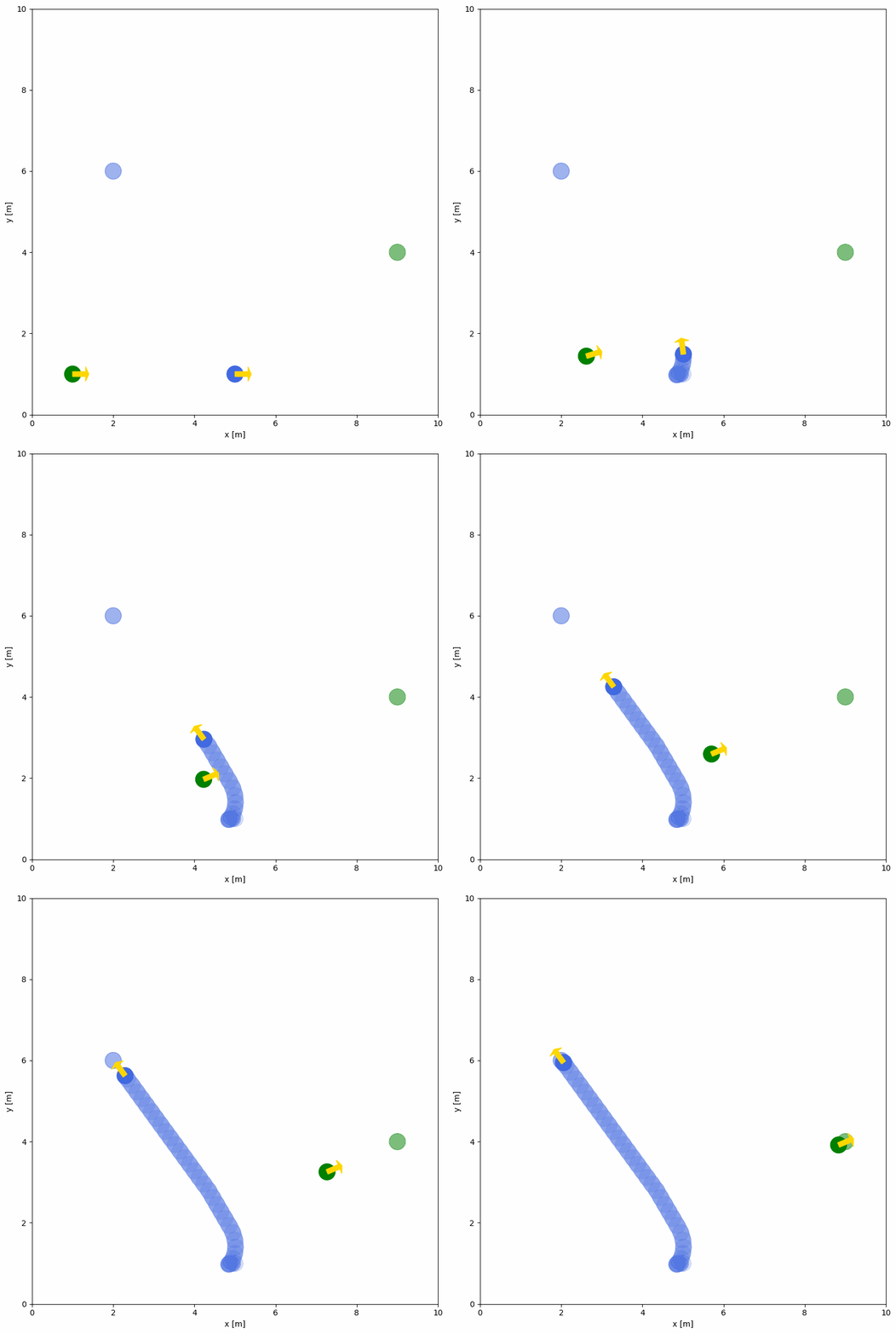
ending_time 表示窗口关闭所需时间。动画的生成同样发生在 env.end() 中,可通过该函数的额外参数控制导出行为。参数细节参见 env.end()。
常用的 GIF 参数示例如下:
loop: GIF 循环次数,默认 0(无限循环)。duration: 每帧持续时间(秒),可统一设置或为每帧单独设置。fps: 每秒帧数,若未提供 duration,则每帧持续时间为 1/fps,默认 10。subrectangles: 若为 True,会仅保存相较上一帧变化的矩形区域以优化 GIF,默认 True。
小技巧
动画生成的原理是保存每一帧的图像,再组合成 GIF 文件。
将动画保存为视频#
在 env.end() 中将文件后缀设为 .mp4,即可把仿真动画保存为视频。请通过 pip install imageio[ffmpeg] 安装 ffmpeg,示例如下:
env = irsim.make(save_ani=True)

for i in range(300):

    env.step()
    env.render(0.05)

    if env.done():
        break

env.end(ending_time=3, suffix='.mp4')
小技巧
更多动画文件后缀可参考 imageio 文档。
3D 绘图#
在 irsim.make 中将 projection 设为 3d,即可渲染仿真的 3D 图,示例如下:
env = irsim.make(projection='3d')

for i in range(300):

    env.step()
    env.render(0.05)

    if env.done():
        break

env.end(3)
world:
  height: 10  # the height of the world
  width: 10   # the width of the world
  step_time: 0.1  # 10Hz calculate each step
  sample_time: 0.1  # 10 Hz for render and data extraction
  offset: [0, 0] # the offset of the world on x and y
  plot:
    show_title: False

robot:
  kinematics: {name: 'diff'}  # omni, diff, acker
  shape: {name: 'circle', radius: 0.2}  # radius
  # shape: {name: 'rectangle', length: 0.3, width: 1.0}
  state: [1, 1, 0]
  goal: [9, 9, 0]
  # acce: [3, .inf]   # acce of [linear, angular]  or [v_x, v_y] or [linear, steer]
  behavior: {name: 'dash'} # move toward to the goal directly
  color: 'g'
  plot:
    show_trajectory: True
    show_trail: True
  # description: 'diff_robot0.png'

  sensors:
      - name: 'lidar2d'
        range_min: 0
        range_max: 5
        angle_range: 3.14 #  4.7123
        number: 200
        noise: False
        std: 0.2
        angle_std: 0.2
        alpha: 0.3
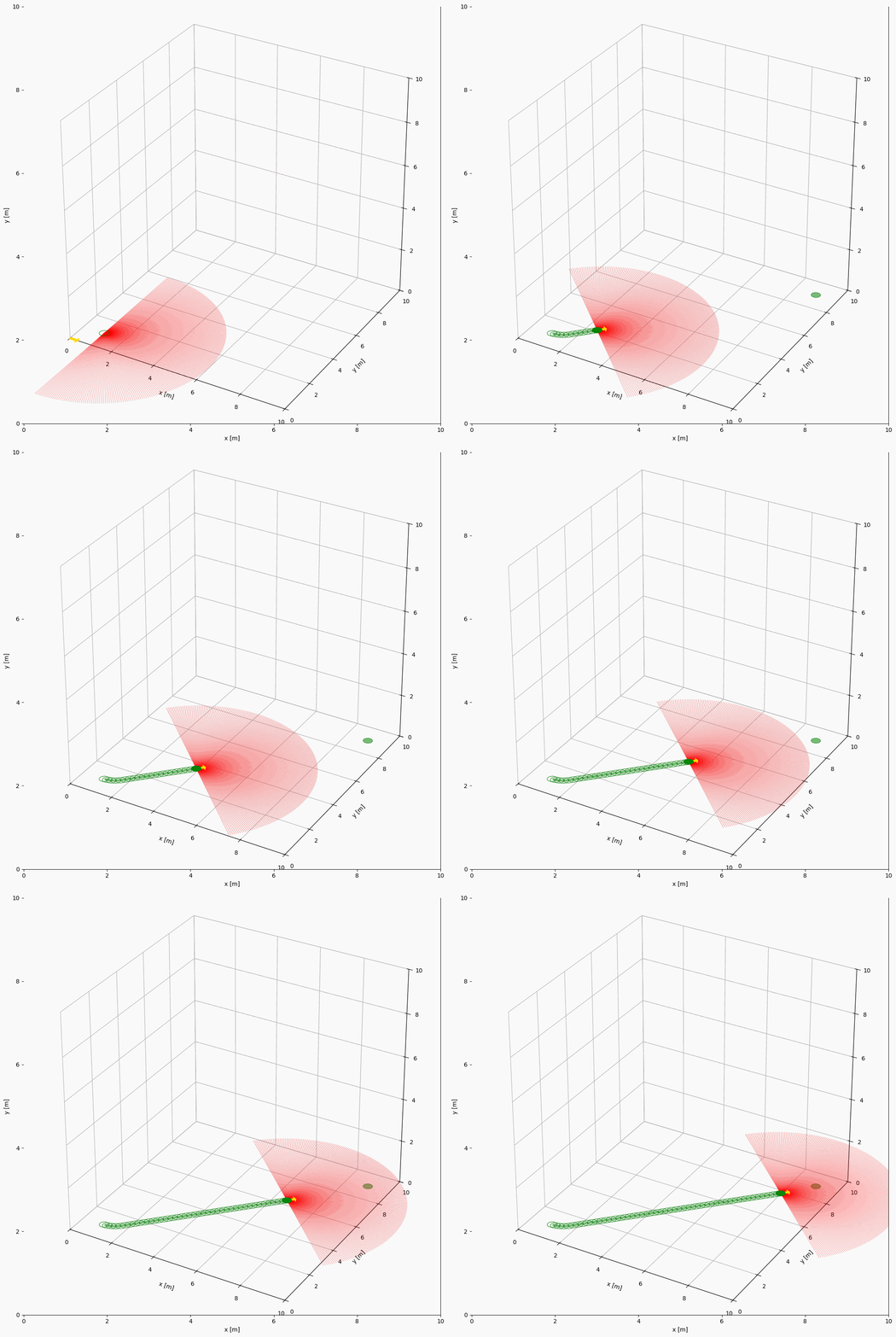
备注
当前 3D 绘图仅在三维空间展示 2D 对象,尚不支持真 3D 对象。