
配置机器人与障碍物#
要在环境中有效地模拟机器人,需要定义并配置多项机器人参数。
机器人配置参数#
仿真中的每个机器人都通过 YAML 配置文件中的参数定义。下面是一个简单示例:
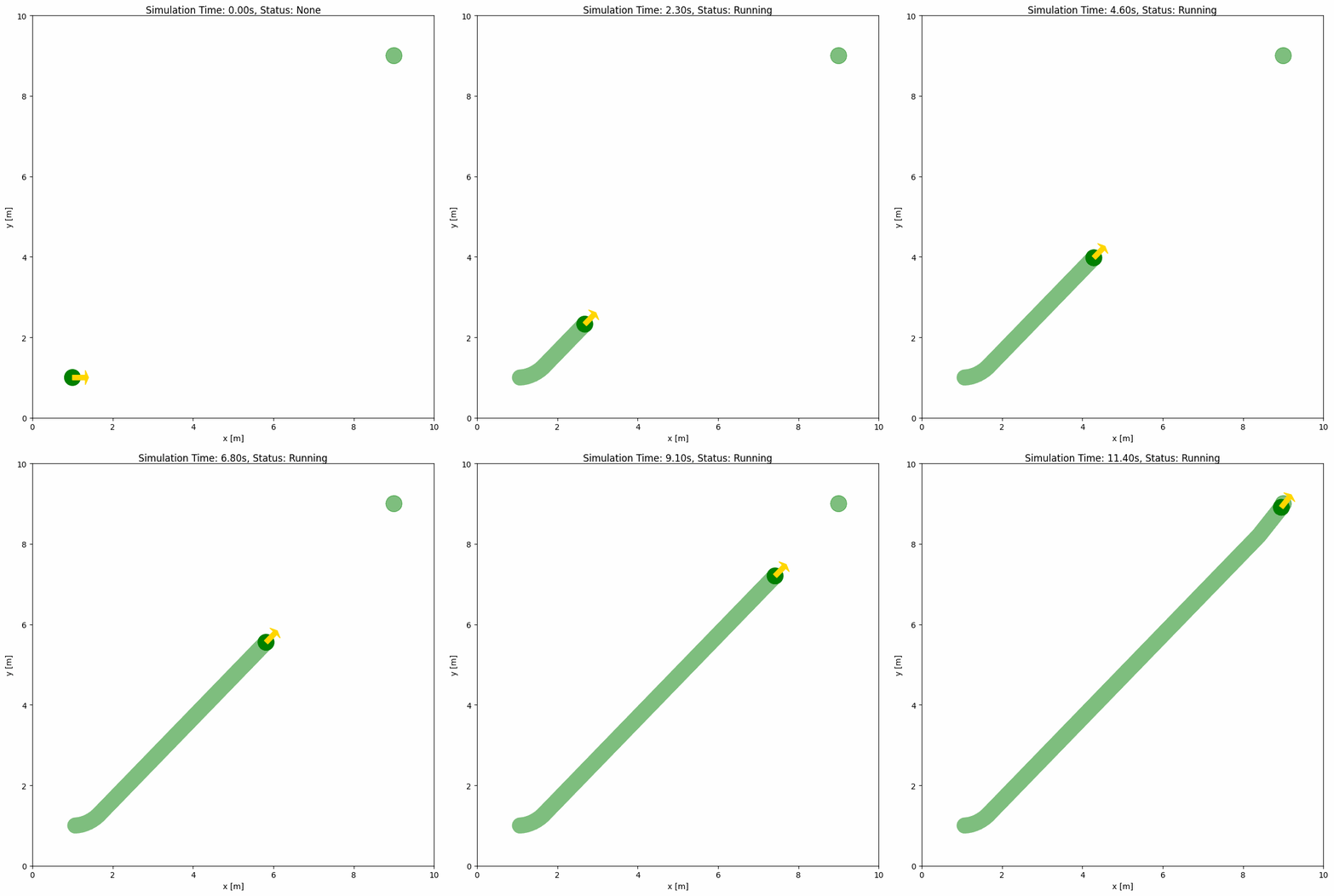
对应的 Python 脚本与 YAML 配置如下:
import irsim

env = irsim.make("robot_world.yaml")

for i in range(1000):
    env.step()
    env.render(0.05)

    if env.done():
        break

env.end()
world:
  height: 10
  width: 10

robot:
  kinematics: {name: 'diff'}
  shape: {name: 'circle', radius: 0.2}
  state: [1, 1, 0]
  goal: [9, 9, 0]
  behavior: {name: 'dash'}
  plot:
    show_trajectory: True
    show_goal: True
关键参数说明#
kinematics: 定义机器人的运动学模型,可选'omni'、'omni_angular'、'diff'、'acker'。'omni':全向轮,可向任意方向移动(无朝向控制)。'omni_angular':带偏航角速度控制的全向移动(可独立平移和旋转)。'diff':差速驱动,可前后移动并旋转。'acker':阿克曼转向,常用于车式机器人。
运动学对比:
运动学 |
控制输入 |
典型用途 |
可原地旋转? |
|---|---|---|---|
|
|
全向机器人、无人机 |
✗ 不可以 |
|
|
带朝向的全向机器人 |
✓ 可以 |
|
|
双轮机器人 |
✓ 可以 |
|
|
汽车及车式机器人 |
✗ 不可以 |
shape: 指定机器人的物理形状与尺寸,可选'circle'、'rectangle'、'polygon'、'compound'、linestring。circle:给定半径的圆形机器人。rectangle:具有特定长宽的矩形机器人。polygon:多边形机器人。compound:由圆形、矩形或多边形部件组成的刚性组合形状。linestring:由线段组成的形状。
state: 定义机器人在环境中的初始位置与朝向。goal: 指定机器人的目标位置与朝向。behavior: 指定在未提供外部控制指令时,机器人如何在env.step()中生成速度。若省略该项,除非通过env.step(velocity)传入速度指令,否则机器人将保持静止。plot(可选):设置机器人的可视化样式。参见plot()。
对于 compound 形状,对象的 state 驱动整个刚体运动。每个部件可选的 pose: [x, y, theta] 固定在对象坐标系中,默认值为 [0, 0, 0]。所有部件使用所属对象的颜色。show_trajectory 与其他形状一样使用路径线渲染。默认宽度为组合体在局部 y 方向上的范围,路径线沿该范围的中点移动,使轨迹宽度与本体宽度对齐。路径线不会还原凹形或分离足迹中的空白;如需精确的历史形状快照,请使用 show_trail。
上面的示例显式设置了 behavior: {name: 'dash'},因此在调用 env.step() 且不传入速度时,机器人会从初始状态向目标移动。
说明#
env.step(): 将仿真推进一个时间步。可通过env.step(velocity)注入控制指令以运行自定义算法,velocity对应机器人kinematics。详情见step()。env.render(0.05): 以 0.05 秒间隔渲染环境状态。详情见render()。env.done(): 检查是否满足终止条件(如达到目标或发生碰撞)。详情见done()。env.end(): 优雅结束仿真并释放资源,确保干净退出。详情见end()。
备注
rda_planner 展示了如何通过 env.step(velocity) 运行自定义控制算法。
备注
在 kinematics 字典中将 noise 设为 True,即可为机器人或障碍物的运动学添加高斯噪声。详见 YAML 配置。
障碍物配置参数#
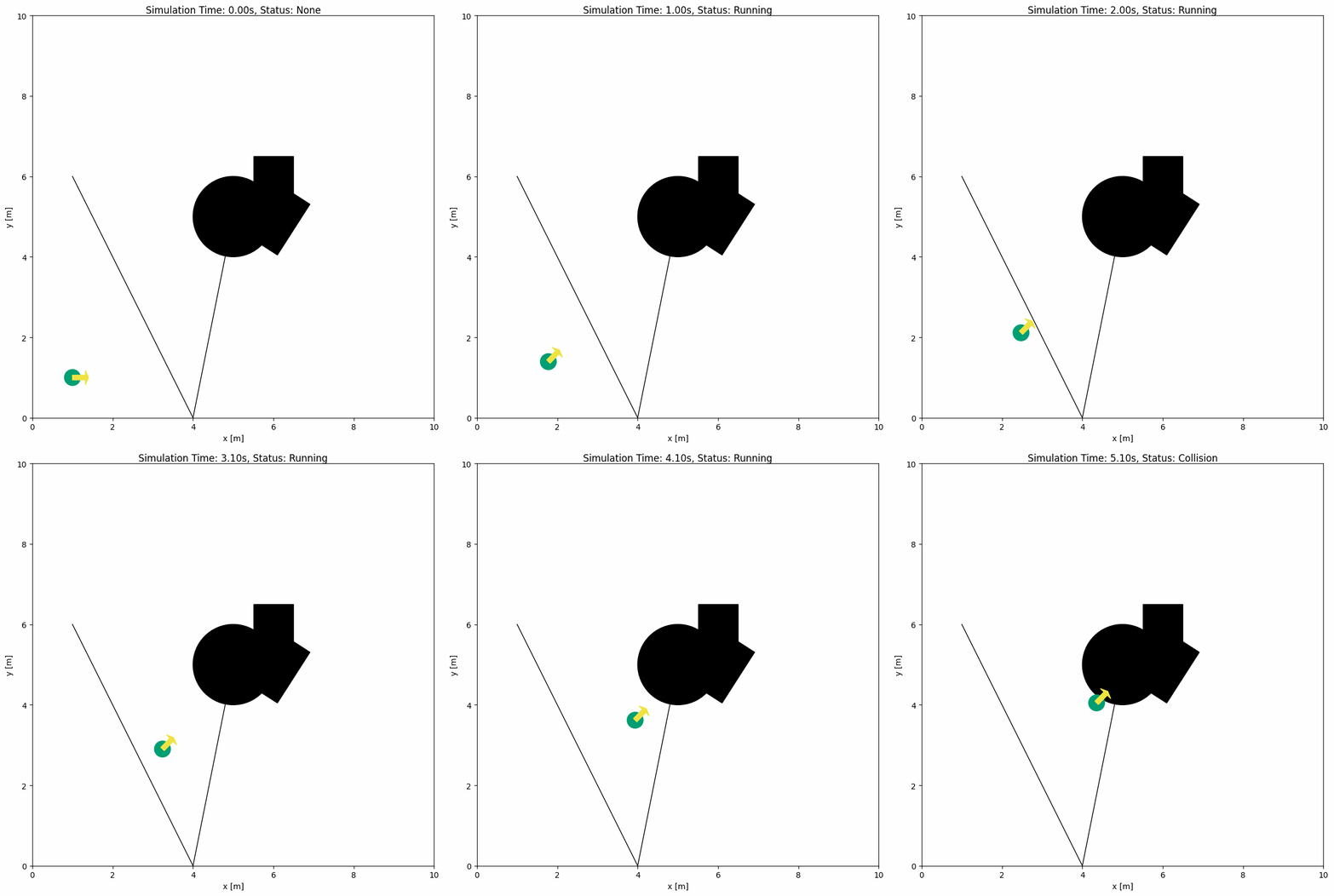
仿真中障碍物的参数与机器人类似。下例展示了在 YAML 中添加多类障碍物并复用同一 Python 脚本。
import irsim

env = irsim.make("robot_world.yaml")

for i in range(1000):
    env.step()
    env.render(0.05)

    if env.done():
        break

env.end()
world:
  height: 10
  width: 10

robot:
  kinematics: {name: 'diff'}
  shape: {name: 'circle', radius: 0.2}
  state: [1, 1, 0]
  goal: [9, 9, 0]
  behavior: {name: 'dash'}
  plot:
    show_trajectory: True
    show_goal: True

obstacle:
  - shape: {name: 'circle', radius: 1.0}  # radius
    state: [5, 5, 0]

  - shape: {name: 'rectangle', length: 1.5, width: 1.2}  # length, width
    state: [6, 5, 1]

  - shape: {name: 'linestring', vertices: [[5, 5], [4, 0], [1, 6]] }  # vertices
    state: [0, 0, 0]
    unobstructed: True

  - shape:
      name: 'polygon'
      vertices:
        - [4.5, 4.5]
        - [5.5, 4.5]
        - [5.5, 5.5]
        - [4.5, 5.5]
关键参数说明#
unobstructed:设为
True时,该对象不参与碰撞检测。mass:质量(千克)。仅在
collision_mode: 'contact'下使用:有限质量使障碍物成为可推动的物体,不设置质量则保持不可移动。没有运动学的可推动障碍物默认以橙色(#E69F00)绘制。参见物理属性与接触模式。friction:与地面的库仑摩擦系数,默认
0.5。仅在collision_mode: 'contact'下使用:它让松开的物体减速停下,并与mass一起决定机器人能否推动它。参见物理属性与接触模式。inertia:转动惯量(kg·m²),未设置时由形状和质量计算。仅在
collision_mode: 'contact'下使用:没有对准可推动障碍物中心的推力会让它转动。参见物理属性与接触模式。restitution:材料的弹性,从
0(默认,不反弹)到1。仅在collision_mode: 'contact'下使用。参见物理属性与接触模式。
备注
机器人与障碍物的主要区别:
Parameter |
Robot Default |
Obstacle Default |
|---|---|---|
|
|
|
|
green |
|
|
User-defined |
|
|
|
|
配置提示:
未设置
kinematics的对象是静态对象,除非为contact碰撞模式赋予了有限的mass同时配置
kinematics与behavior可创建会移动的机器人或障碍物使用自定义控制器而不是配置行为时,请向
env.step(velocity)传入速度指令列表中使用
-定义每个新的机器人/障碍物
警告
请确保障碍物不要放在机器人初始位置,否则仿真开始时就会发生碰撞。
物理属性与接触模式#
默认情况下(collision_mode: 'stop'),对象一旦相触就会停下。在 world 部分设置 collision_mode: 'contact' 会把碰撞变成接触:每一步之后,重叠的对象沿接触法线被推开,遵循 PhysX 等物理引擎(Isaac Sim、CARLA)处理刚体的规则,并简化为 mass、friction、inertia 和 restitution 几个属性。只要机器人的牵引力胜过箱子的地面摩擦,它就以自身速度推动箱子;过重的箱子会让它停滞;轮子的抓地力也限制着它启动和停下的快慢;偏心被撞的箱子会转动;松开的箱子滑行一段后停下;墙壁会挡住一切压向它的物体;还可以让机器人的驱动具有真实底盘的滞后。
mass(float,千克):有运动学的对象默认为1.0。没有运动学的对象没有质量(inf),永不移动;为其设置有限mass后,它会成为可被推动但不会自行移动的物体。在number下给出列表可为每个对象设置各自的质量。这类物体在未设置color时以橙色(#E69F00)绘制,一眼就能看出哪些只会被推动,而有运动学的障碍物保持原有颜色;该色调是色盲友好的 Okabe-Ito 橙色,灰度打印时仍与黑色区分明显。质量与friction一起给出对象的地面摩擦力friction * mass * g:机器人只有在自身的值不小于该物体及其前方所推动的一切物体之和时才能推动它,因此材料相同时,机器人能推动总计不超过自身质量的箱子(单个或成排),超过则会停滞。静态对象和栅格地图始终不可移动。friction(float,默认:世界的friction,即0.5):与地面的库仑摩擦系数,即 PhysX 的默认材料值。松开的物体以friction * gravity(默认 9.81 m/s²)减速直到停下,因此从 1 m/s 开始约滑行 5 cm;friction: 0会让它一直滑行。压在墙上的物体只有当推力离开两表面的摩擦锥(取二者系数的平均值;为 0.5 时,与墙面法线夹角超过 27° 的推力才会滑动)时才沿墙滑动,而机器人总能滑动,因为它的轮子可以沿墙行驶。在number下给出列表可为每个对象设置各自的系数。inertia(float,kg·m²):绕对象质心的转动惯量,未设置时由形状和质量计算:圆盘为m r² / 2,矩形为m (l² + w²) / 12,多边形为精确的极惯性矩。任何偏心的推力都会让箱子转动;机器人在推动时保持朝向,但被墙或推不动的负载挡住时,偏心的接触会像打滑的轮子那样使它偏转。旋转的物体像滑动的物体一样在摩擦下减速。restitution(float,默认:世界的restitution,即0):材料的弹性,0表示完全非弹性接触(与 Isaac Lab 的默认材料相同),1表示弹性接触。两个物体相撞后以二者取平均的恢复系数乘以接近速度分离:restitution: 1的无摩擦圆盘被同种材料、以 1 m/s 推动的机器人推出时速度为 2 m/s,撞上同种材料的墙后以到达时的速度弹回;机器人或墙保持默认值0时反弹减半。只有被动物体会反弹,且只在能推动它的接触上反弹:机器人推不动的箱子不会被反复撞击而向前挪动。机器人的驱动会重新施加它的速度。牵引限制:在接触模式下,机器人的轮子每秒最多只能把速度改变
friction * gravity,因为它们对地面的抓地力仅此而已。默认0.5时,从 1 m/s 启动或停下需要三个 0.1 s 的步长、约 5 cm,因此控制器无法让机器人在一步之内停下或反向;friction: 0的机器人完全无法移动,如同物理引擎中那样。为机器人设置friction: 1.0相当于橡胶轮,推力和加速都更强。驱动滞后(
kinematics: {name: 'diff', tau: 0.2}):在接触模式下,机器人的实际速度可以按时间常数tau的一阶响应跟随指令,如同速度环较软的底盘,因此它无法在一步之内停下或反向。默认为0,即时跟随,这与 Isaac 的默认刚性驱动在此步长下的表现一致,其他碰撞模式也始终即时跟随。停滞的机器人仍以全指令持续推动,而其本体速度读数为零,如同打滑的轮子。世界默认值:
world部分下的gravity(9.81)、friction(0.5)、restitution(0)和drive_tau(0)是每个对象起始的物理参数;对象自己的friction或restitution,或其kinematics下的tau,会覆盖它们。地面较滑时降低世界的friction,设置drive_tau: 0.2可让所有机器人具有小型底盘的驱动滞后。接触的作用:被推动的物体随推动者一起运动,因此指令速度为 1 m/s 的 1 kg 机器人会以 1 m/s 推动 0.25 kg 或 1 kg 的箱子,而 4 kg 的箱子会让它停滞,因为机器人的牵引力
0.5 * 1 kg * g小于箱子的地面摩擦力0.5 * 4 kg * g;顶在墙上的箱子会挡住机器人。两个被动物体之间,或两个机器人之间,重叠量按mass的倒数比例分摊,即完全非弹性碰撞:以 1 m/s 滑行的 1 kg 箱子撞上静止的 3 kg 箱子后,两者都以 0.25 m/s 运动。没有对准物体中心的推力还会让它转动:接触点和法线给出一个力矩,由物体的转动惯量抵抗,因此靠近角落被撞的箱子会边被推边旋转,被一个角压到墙上的箱子会绕这个角转动,而穿过中心的推力只会让它滑动。推动产生的位移和转动会并入各对象的速度,因此激光雷达、RVO 和 SFM 的邻居以及env.get_msg()都能看到箱子在动。它不做什么:成功推动时机器人不会被转动,因为它的驱动保持着朝向;除非设置了
restitution,否则没有任何反弹。接触不会让对象停止,因此collision保持False,env.done()只报告到达;取而代之的是可改用对象自带接触传感器obj.contact的读数:obj.contact.in_contact、obj.contact.partners与obj.contact.force(牛顿,世界坐标系,按 XPBD 的方式由约束冲量估算)给出上一步相触的对象以及推力多大,被持续推动的箱子报告它克服的地面摩擦力,停滞的机器人报告它的牵引力,即打滑的轮子最多能推出的力;obj.contact.reports从对象自身的角度给出每个接触:other、point、指向该对象的normal、depth和force,可直接打印成一句话,env.contacts则是原始的成对记录;obj.contact.contact_time和obj.contact.air_time说明对象已持续接触或自由了多久,obj.contact.started和obj.contact.ended标记接触开始或结束的那一步;env.get_msg()则以每个对象状态上的contact_force、contacts、contact_time和air_time携带全部这些信息。为对象添加sensors: [{type: 'contact2d'}]可绘制其接触点和力线,见配置传感器。step_mode: 'external'下不解算接触;请让speed * step_time小于对象半径,以免一步之内穿过细的linestring墙。
下面的示例(usage/26push_box_world/)中,三个相同的机器人把 0.25、2 和 1 kg 的箱子推向一堵墙:
import irsim

env = irsim.make("push_box_world.yaml")
boxes = env.obstacle_list[:3]

for _ in range(200):
    env.step()
    env.render(0.02)

for robot, box in zip(env.robot_list, boxes, strict=True):
    print(f"{box.name} ({box.mass:g} kg) moved {box.state[0, 0] - 3:.2f} m")

env.end(3)
world:
  height: 12
  width: 12
  step_time: 0.1
  collision_mode: 'contact'   # touching objects push each other apart by mass

robot:
  - number: 3
    distribution: {name: 'manual'}
    kinematics: {name: 'diff'}
    shape: [{name: 'circle', radius: 0.3}]
    mass: 1.0
    state: [[1, 2, 0], [1, 6, 0], [1, 10, 0]]
    goal: [[11.5, 2, 0], [11.5, 6, 0], [11.5, 10, 0]]
    behavior: {name: 'dash'}
    vel_max: [1.0, 1.0]

obstacle:
  - number: 3
    distribution: {name: 'manual'}
    shape: [{name: 'rectangle', length: 0.8, width: 0.8}]
    state: [[3, 2, 0], [3, 6, 0], [3, 10, 0]]
    mass: [0.25, 2.0, 1.0]      # a finite mass makes an obstacle pushable (drawn in orange)

  - shape: {name: 'rectangle', length: 0.4, width: 11}   # no mass: immovable wall
    state: [10.5, 6, 0]
0.25 kg 和 1 kg 的箱子以机器人的速度前进,而 2 kg 的箱子对 1 kg 的机器人来说太重,会让它停滞;一旦某个箱子顶到墙上,整条链就会停下,尽管机器人仍在请求全速。脚本会在每个箱子上标注它受到的力,并在接触开始和结束时打印机器人的接触报告:对方、接触点、法线和力。同一目录下的 push_box_keyboard.yaml 可以用键盘推着箱子到处走。
备注
接触通过分离轴定理在两个形状的凸片段之间求解(圆、凸多边形和线段;非凸多边形会被三角剖分),因此所有形状都能参与:compound 物体、linestring 墙和栅格地图。参见 irsim.lib.algorithm.contact。
多机器人/障碍物的高级配置#
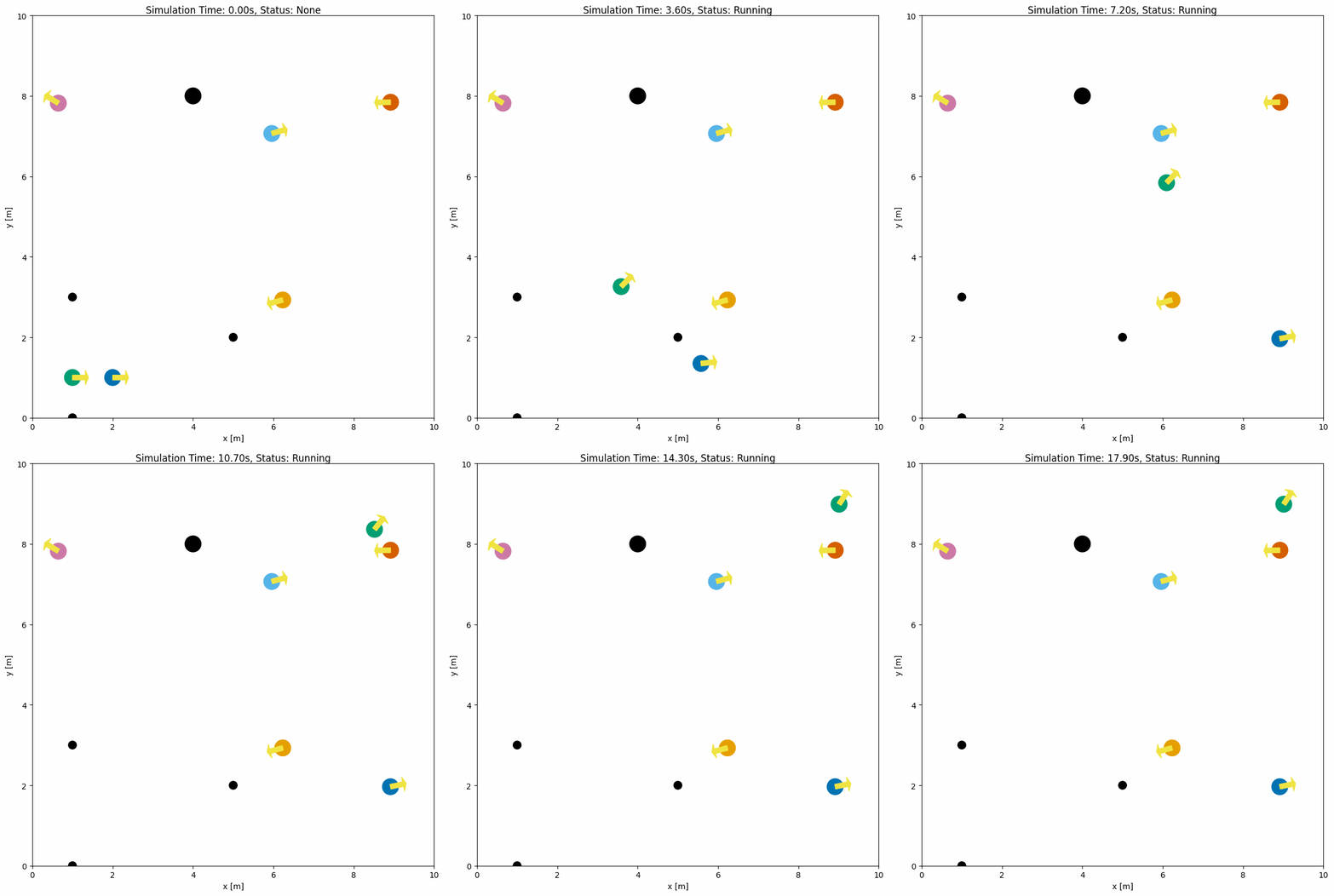
若要在同一环境中模拟多个机器人与障碍物,只需在配置中设置它们的 number 与 distribution。下面是一个包含多个机器人和障碍物的示例:
同一分组中的机器人共用默认的机器人颜色。在分组上设置 color: 'cycle' 可让每个机器人依次使用调色板循环中的下一种颜色,便于在人群中区分它们;颜色列表仍会逐个分配。默认颜色本身是 irsim.config.palette_param 的参数,可以在 irsim.make() 之前修改。
import irsim

env = irsim.make("robot_world.yaml")

for i in range(1000):
    env.step()
    env.render(0.05)

    if env.done():
        break

env.end()
world:
  height: 10  # the height of the world
  width: 10   # the width of the world

robot:
  - number: 2
    distribution: {name: 'manual'}
    kinematics: {name: 'diff'}
    shape:
      - {name: 'circle', radius: 0.2}  # radius
    state:
      - [1, 1, 0]
      - [2, 1, 0]
    goal:
      - [9, 9, 0]
      - [9, 2, 0]
    behavior:
      - {name: 'dash'}
      - {name: 'dash'}
    color: 'cycle'   # one palette color per robot, in order

  - number: 4
    distribution: {name: 'random'}
    color: ['#E69F00', '#CC79A7', '#56B4E9', '#D55E00']   # Okabe-Ito colors after the first group's
    kinematics: {name: 'diff'}
    shape:
      - {name: 'circle', radius: 0.2}  # radius


obstacle:
  - number: 4
    distribution: {name: 'manual'}
    state: [[4, 8], [1, 3], [1, 0], [5, 2]]
    shape:
      - {name: 'circle', radius: 0.2}  # radius
      - {name: 'circle', radius: 0.1}  # radius
备注
distribution参数用于控制机器人和障碍物的布局,可选'manual'或'random'。更多细节见 YAML 配置。
自定义运动学的高级配置#
如果内置模型(diff、omni、omni_angular、acker)不符合你的机器人,可以注册自己的运动学处理器:继承 KinematicsHandler(或某个内置处理器),把模型需要的参数加到 __init__ 中,并用 @register_kinematics 注册:
import numpy as np
from irsim.lib import register_kinematics
from irsim.lib.handler.kinematics_handler import DifferentialKinematics


@register_kinematics("slip_diff")
class SlipDiffKinematics(DifferentialKinematics):
    """Differential drive whose wheels slip: only part of the commanded speed reaches the ground."""

    def __init__(self, name, noise=False, alpha=None, ratio=0.8):
        super().__init__(name, noise, alpha)
        self.ratio = ratio  # fraction of the commanded linear speed that is achieved

    def step(self, state, velocity, step_time):
        achieved = np.array(velocity, dtype=float)
        achieved[0, 0] *= self.ratio
        return super().step(state, achieved, step_time)
Any key under kinematics other than name, noise, alpha, and the built-in drive lag tau is passed to the handler's __init__, so the model's parameters are set directly in YAML:
robot:
  - kinematics: {name: 'slip_diff', ratio: 0.8}
    shape: {name: 'circle', radius: 0.2}
    state: [1, 1, 0]
重要
定义处理器的模块必须在 irsim.make() 之前被导入,注册才会生效。未知的 name 会抛出 NotImplementedError,处理器不接受的键会抛出 TypeError,因此两者的拼写错误都会立即报告。